Posts

Converting Int to Minutes,Hours andSeconds

DECLARE @SecondsToConvert int SET @SecondsToConvert = 3600 -- Declare variables DECLARE @Hours int DECLARE @Minutes int DECLARE @Seconds int DECLARE @Time datetime -- Set the calculations for hour, minute and second SET @Hours = @SecondsToConvert/3600 SET @Minutes = (@SecondsToConvert % 3600) / 60 SET @Seconds = @SecondsToConvert % 60 -- Store the datetime information retrieved in the @Time variable SET @Time = (SELECT RTRIM(CONVERT(char(8), @Hours) ) + ':' + CONVERT(char(2), @Minutes) + ':' + CONVERT(char(2), @Seconds)); -- Display the @Time variable in the format of HH:MMS SELECT CONVERT(varchar(8),CONVERT(datetime,@Time),108)

SPLIT Function

CREATE FUNCTION [DBO].[SPLITDELIMITED] ( @LIST NVARCHAR(2000), @SPLITON NVARCHAR(1) ) RETURNS @RTNVALUE TABLE ( ID INT IDENTITY(1,1), VALUE NVARCHAR(100) ) AS BEGIN WHILE (CHARINDEX(@SPLITON,@LIST)>0) BEGIN INSERT INTO @RTNVALUE (VALUE) SELECT VALUE = LTRIM(RTRIM(SUBSTRING(@LIST,1,CHARINDEX(@SPLITON,@LIST)-1))) SET @LIST = SUBSTRING(@LIST,CHARINDEX(@SPLITON,@LIST)+LEN(@SPLITON),LEN(@LIST)) END INSERT INTO @RTNVALUE (VALUE) SELECT VALUE = LTRIM(RTRIM(@LIST)) RETURN END

Move SQL Server 2005 error log from its default location

You might get this doubt "How do I move the default log files placed in: C:\Program Files\Microsoft SQL Server\MSSQL.2\MSSQL\LOG to a different location?" This may not be required all the times but say on the partition where these log files are stored need few more disk space to freeup, also if you have enbaled to keepup more than 6 error log files online. Simple, for the error log opn SQL Server Configuration Manager, choose the relevant SQL Server services and on the right hand pane go to the advanced tab. Goto startup parameters, you will see the path after -e then change it to required directory, ensure to restart SQL Server services once this change has been affected.

How to move Tempdb to another Drive.

Image
USE TempDB GO EXEC sp_helpfile--By this we can find where the .mdf and .ldf files are placed defaultly. GO USE master GO ALTER DATABASE TempDB MODIFY FILE (NAME = tempdev, FILENAME = 'D:\30-04-2009BAK\Tempdb\datatempdb.mdf') GO ALTER DATABASE TempDB MODIFY FILE (NAME = templog, FILENAME = 'E:\TempdbLog\datatemplog.ldf') GO After running the above query Stop and Restart the services. USE master GO ALTER DATABASE TempDB MODIFY FILE (NAME = tempdev, FILENAME = 'D:\DATA\tempdb.mdf' ) ALTER DATABASE TempDB MODIFY FILE (NAME = temp2, FILENAME = 'D:\DATA\tempdb_mssql_2.ndf' ) ALTER DATABASE TempDB MODIFY FILE (NAME = temp3, FILENAME = 'D:\DATA\tempdb_mssql_3.ndf' ) ALTER DATABASE TempDB MODIFY FILE (NAME = temp4, FILENAME = 'D:\DATA\tempdb_mssql_4.ndf' ) GO ALTER DATABASE TempDB MODIFY FILE (NAME = templog, FILENAME = 'D:\DATA\templog.ldf' ) GO After this change stop and start the services and you can see...

Trigger Example

The below trigger discuss about INSERT and UPDATE Events on Table table will effect on same table. Below example discussed about the same scenario. CREATE TABLE Table1 (ID INT IDENTITY(1,1),[Name] VARCHAR(50),AGE INT,Marks INT) GO CREATE TABLE Table2 (ID INT IDENTITY(1,1),[Name] VARCHAR(50),AGE INT,Marks INT) GO CREATE TRIGGER UpTodateTable2 ON Table1 FOR INSERT,UPDATE AS BEGIN IF EXISTS(SELECT ID FROM Table1 WHERE ID NOT IN (SELECT ID FROM Table2 )) BEGIN INSERT INTO Table2 SELECT [Name],Age,Marks FROM Inserted END IF EXISTS(SELECT T2.ID FROM Table2 AS T2 INNER JOIN Table1 as T1 ON T1.ID=T2.ID) BEGIN UPDATE TABLE2 SET [NAME]=I.[NAME], AGE=I.AGE, MARKS=I.MARKS FROM TABLE1 AS I INNER JOIN TABLE2 AS T2 ON T2.ID=I.ID END END GO INSERT INTO Table1 SELECT 'Mohan',30,20 GO update Table1 SET [Name]='ReddyChinna' WHERE id=2 GO SELECT * FROM Table1 SELECT * FROM Table2

Converting Multiple Rows into Single Column

This is one example for coverting Multiple Rows into Single Column. DECLARE @TABLE TABLE (SNO INT) DECLARE @STRING CHAR(10) INSERT @TABLE SELECT 1 UNION SELECT 2 UNION SELECT 3 UNION SELECT 4 UNION SELECT 5 SELECT * FROM @TABLE SET @STRING='' SELECT @STRING=CONVERT(VARCHAR(50),SNO)+';'+@STRING FROM @TABLE SELECT LEFT(@STRING,LEN(@STRING)-1)

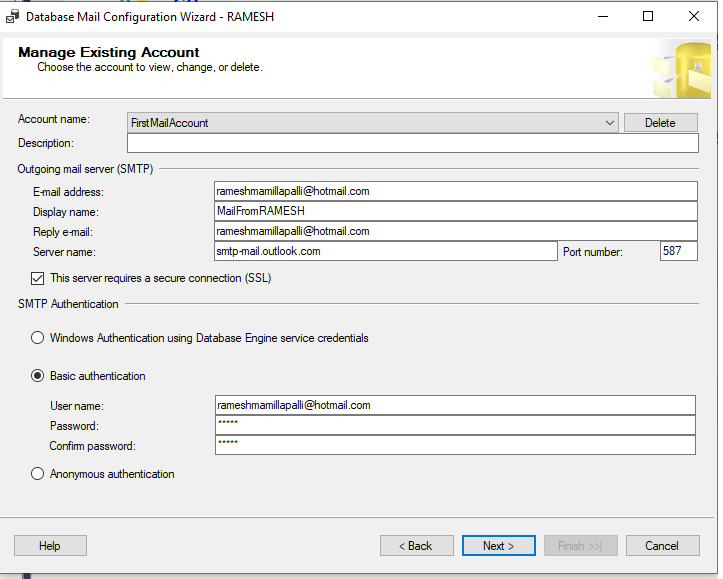
SQL Server 2005 Mail Configuration with Example.

Image
use master go sp_configure 'show advanced options' , 1 go reconfigure with override go sp_configure 'Database Mail XPs' , 1 --go --sp_configure 'SQL Mail XPs',0 go reconfigure go ------------------------- EXECUTE msdb.dbo.sysmail_add_account_sp @ account_name = 'DatabaseBackupStatus' , @ description = 'To know about the database backup status.' , @ email_address = 'a.rameshk@yahoo.com' , @ display_name = 'From DatabaseBackupStatus' , @ username = 'sa' , @ password = 'sa' , @ mailserver_name = '192.168.41.11' ----- EXECUTE msdb.dbo.sysmail_add_profile_sp @ profile_name = 'Profile for Database Backup' , @ description = 'Profile for Database Backup' --------- EXECUTE msdb.dbo.sysmail_add_profileaccount_sp @ profile_name = 'Profile for Database Backup' , @ account_name = 'DatabaseBackupStatus' , @ sequen...

.sqlwb is missing

After installing SQL Server 2005. I am unable to see the SQL Server Management Studio by clicking sqlwb from Run. Normally we can find this in the below default path C:\Program Files\Microsoft SQL Server\90\Tools\Binn\VSShell\Common7\IDE But in my installation i did not find sqlwb.exe file.So what i did was I copied IDE folder from other Server.And copied into my local. It is wroking perfectly for me. Thanks Ramesh.M

REVOKE VIEW ANY DATABASE TO Public

This command will stop users to view the Databases which are all existing in that particular server. REVOKE VIEW ANY DATABASE TO Public And want to give permission to the users(Other Logins) to see the database run this below command. GRANT VIEW ANY DATABASE TO Public Thanks Ramesh.M

Deny table Permission at Table Level:

Deny table Permission at Table Level: 1)Connect SQL Server through windows authentication at Sysadmin Level 2)Under Security Find Logins Eg: Under my Security there are logins like Prasad,Rameh,Siva 3)Now i decided I want to give Deny Table permission to Siva named Login 4)Now Click on Siva Login Properties->Go to Server Roles->Give Public->Don’t give any other Server roles. And especially Don’t give sysadmin server role and at the same time he should not be the owner of that database(db_owner) 5)Next open Query Analyzer run the below Script. use MCTS GO GRANT INSERT TO Siva GO use MCTS GO GRANT SELECT TO Siva GO use MCTS GO GRANT UPDATE TO Siva GO use MCTS GO DENY DELETE TO Siva--This Stops Dropping and Deleting 6) After running the query If siva next time login by using his credentials he can not run delete script. ----CREATING A ROLE AND ASSIGNING MEMBER TO IT. Here i am creating a database role which will not allow users to take a specific datab...

ALTER SCHEMA

In Adventure Works Sample database which is in SQL Server 2005 contains tables like HumanResources.Employee HumanResouces.Address Person.Address If we run the These tables without giving schema name we can not get the result. For Eg:SELECT * FROM Employee--Here we wont get results because we are not giving schema name here. If we write query then only we will get the result like SELECT * FROM HumanResources.Employee--We can get result here. Now i want to change the schema from HumanResources to dbo so that i can get the result without mentioning the Schema name before the table ALTER SCHEMA dbo TRANSFER HumanResources.Employee This statement changes Table from HumanResources.Employee to Employee. And we can get the result.

WITH NOCHECK/CHECK

You can add or enable the constraint without checking existing rows,but the constraint will be marked as not trusted. If you try to add or enable a constraint checking existing rows, and there is a row breaking the constraint,then you will not be able to add or enable the Constraint The below Example gives the Scenario: CREATE TABLE Books (Bookid INT IDENTITY(1,1) PRIMARY KEY,[Name] VARCHAR(25)) GO CREATE TABLE Authors (Sno INT IDENTITY(100,1),AuthorName VARCHAR(25),BookID INT) ---At this sage there no foreign key relation specified. INSERT Books ([Name]) VALUES('Ten Commandments') GO INSERT Authors (AuthorName,BookID) VALUES('Sydney',10)---Data is inserted in both the Table.No relations defined so far. ----Now i want to define the relation based on Existing Tables and Data First i ran this query to Create Foreign Key Relation. ALTER TABLE Authors ADD CONSTRAINT FK_Books_Bookid FOREIGN KEY(BookID) REFERENCES Books(BookID)--This is Giving me Error because alreay Data is ...

Getting the tables in all the databases at one time.

By running the below system stored procedure we can get the tables in all the database in the server sp_msforeachdb @command1='USE ?;SELECT * FROM sys.Tables'

Agent XPs Disabled

By running the Below query we can Enable Agent XP Enable: sp_configure 'show advanced options', 1; GO RECONFIGURE; GO sp_configure 'Agent XPs', 1; GO RECONFIGURE

How to Enable SQL Server Service Broker

Run this query ALTER DATABASE DataBaseName SET ENABLE_BROKER WITH ROLLBACK IMMEDIATE We can run the query without rollback statement. But it takes so much time. And we can find out the result by running this query.We can come to know that whether services have been restored or not. SELECT [name], is_broker_enabled FROM sys.databases WHERE [Name]='DatabaseName'

CAN NOT CONNECT TO WMI PROVIDER

I am trying to Connect to the Configurationg Manager and getting Error as: Can not Connect to WMI Provider Soluting for this is :Go to Command Prompt(cmd) Copy the below path and paste mofcomp "C:\Program Files\Microsoft SQL Server\90\Shared\sqlmgmproviderxpsp2up.mof" and Press Enter get the message like this. Microsoft (R) 32-bit MOF Compiler Version 5.1.2600.2180 Copyright (c) Microsoft Corp. 1997-2001. All rights reserved. Parsing MOF file: C:\Program Files\Microsoft SQL Server\90\Shared\sqlmgmprovider xpsp2up.mof MOF file has been successfully parsed Storing data in the repository... Done!

Common Solutions For DBA Automated Practices.

---This link will be useful for Common DBA automated Pracitces. http://code.msdn.microsoft.com/SQLExamples/Wiki/View.aspx?title=AutomatedDBA

The SQLSERVERAGENT Service On Local Computer started and then Stopped.Some Services Stop Automatically if they have no work to do.

I got this error while i am trying to start the SQLSERVERAGENT( SQLSERVER 2000 )from services(services.msc).If i right Click and trying to start the service i am getting this error. Solution for this is : Go to Properties of SQLServerAgent->Connections->Check SQL ServerAuthentication->Choose Logins from dropdownlist and he should be the member of sysadmin role.Click Ok. Then SQL Server Agent will start

Derived Query - GROUP BY

Here i am writing about derived query when we can use, and why I am writing a query which gives me results as Total Emails went to one particular Person(Here we can consider FirstName,LastName) And i am going to get these requirement by using GROUP BY Normally we have to use all columns whatever we mentioned in the SELECT statement.We have to mention all the columns in GROUP BY also. But i want to get the result using FirstName,LastName in GROUP BY. But it is not possible if you have many columns along with FirstName and LastName in Select Query.We have to give all the columnnames. But by using DerivedQuery we can use this Find below Query. SELECT Y.*,X.cnt FROM ( select count(1) cnt, ISnull(Table2.FirstName,'') as FirstName ,isnull(Table2.LastName,'') AS LastName FROM Table1 INNER JOIN Table2 ON Table1.emailID = Table2.EmailID LEFT OUTER JOIN Table3 AS Table3 ON Table1.EmailID=Table3.EmaiID WHERE 1=1 GROUP BY ISnull(Table2.FirstName,'') ,i...

STUFF and REPLACE.

STUFF (character expression, start, length, character expression) Eg: SELECT STUFF('ABCDEF', 2, 3, 'JKLMN') ResultSet AJKLMNEF What this STUFF Function will do is 1)Checks First two characters in the Character Expression(‘ABCDEF’) 2)Those two characters are BC in the Character Expression. 3)This starts count from B to D (Total Count 3) 4)So it removes BCD and Place JKLMN in that place. 5)So result set appears as AJKLMNEF REPLACE: REPLACE will also do the same with the Different way. REPLACE (string_expression1, string_expression2, string_expression3) Eg: SELECT REPLACE('ABCDEF','BCD','JKLMN') ResultSet: AJKLMNEF The way REPLACE Works is: 1)First it checks for the BCD in ABCDEF 2)And Remove BCD and Place JKLMN in the place of BCD 3)So output look like as AJKLMNEF

Schema Information Could not be retrieved because of the Following Error: "Lock request time out period Exceed"

I am getting this error while i am working with TeamFoundationSystem for Database Professionals.I am using this tool comparing schema Database to DatabaseProject. And i troubleshooted this problem if i click on Ques in Service Broker. So i ran SP_WHO command in that particular database. and find the blk column and KILL the session id.

Which schema is used in Which Object

--To find out which database schemas(dbo.data_reader,data_writer,lhi\ramesh) are used in which object We can find out that by running this query. SELECT SS.NAME,SO.NAME as ObjectName,SO.Type,SO.SCHEMA_ID FROM SYS.OBJECTS SO INNER JOIN SYS.SCHEMAS SS ON SO.SCHEMA_ID=SS.SCHEMA_ID WHERE SS.Name LIKE 'dbo' ORDER BY Type

Error MSB4018: The "SqlBuildTask" task failed unexpectedly.

While i am working with Team Foundationt System For Database Professionals 2008. By the time of building the Datbase Project i got this Error. Solution is restarting VS IDE.

SET ANSI_WARNINGS ON

This is a small example to understand the behaviour of SET ANSI_WARININGS option. ----Here SET ANSI_WARNINGS is ON SET ANSI_WARNINGS ON IF EXISTS(SELECT * FROM SYS.OBJECTS WHERE TYPE='U' AND [Name]='AnsiWarningsOn') BEGIN DROP TABLE AnsiWarningsOn END CREATE TABLE AnsiWarningsOn ([Name] VARCHAR(2)) INSERT INTO AnsiWarningsOn VALUES('Ramesh Mamillapalli') -----SET ANSI_WARNINGS is OFF SET ANSI_WARNINGS OFF IF EXISTS(SELECT * FROM SYS.OBJECTS WHERE TYPE='U' AND [Name]='AnsiWarningsOn') BEGIN DROP TABLE AnsiWarningsOn END CREATE TABLE AnsiWarningsOn ([Name] VARCHAR(2)) INSERT INTO AnsiWarningsOn VALUES('Ramesh Mamillapalli') SELECT * FROM AnsiWarningsOn

Behaviour of SET NUMERIC_ROUNDABORT and SET ARITHABORT

This specifies the level of Error Reporting generated when rounding in an expression causes a loss of precision ------------Here SET NUMERIC_ROUNDABORT ON and SET ARITHABORT OFF SET NOCOUNT ON PRINT 'SET NUMERIC_ROUNDABORT ON' PRINT 'SET ARITHABORT ON' SET NUMERIC_ROUNDABORT ON SET ARITHABORT ON GO DECLARE @Result DECIMAL(5,2), @Value_1 DECIMAL(5,4), @Value_2 DECIMAL(5,4) SET @Value_1=1.1234 SET @Value_2=1.1234 SELECT @Result=@Value_1+@Value_2 SELECT @Result -------Here SET NUMERIC_ROUNDABORT OFF and SET ARITHABORT ON SET NOCOUNT ON PRINT 'SET NUMERIC_ROUNDABORT OFF' PRINT 'SET ARITHABORT ON' SET NUMERIC_ROUNDABORT OFF SET ARITHABORT ON GO DECLARE @Result DECIMAL(5,2), @Value_1 DECIMAL(5,4), @Value_2 DECIMAL(5,4) SET @Value_1=1.1234 SET @Value_2=1.1234 SELECT @Result=@Value_1+@Value_2 SELECT @Result ------------------Here SET NUMERIC_ROUNDABORT OFF and SET ARITHABORT OFF SET NOCOUNT ON PRINT 'SET NUMERIC_ROUNDABORT OFF' PRINT 'SET ARITHABO...

BACKUP DATABASE script

USE master GO BACKUP DATABASE NorthWind TO DISK=N'D:\NorthwindBackup.BAK' WITH NAME=N'Northwind Database Full Backup',DESCRIPTION='Starting Point for Recovery',INIT,STATS=10

Adding DEFAULT Constraint For Existing Column in Table

CREATE TABLE tester (dates datetime) GO ALTER TABLE [dbo].tester ADD CONSTRAINT [DF__AccountMe__Creat__4D4A6AA9pppp] DEFAULT (getdate()) FOR dates

TimeOut Error

Timeout error occures when Comparing Large Databases with Databse Project while working with Team Foundation System For Database Professionals .If you receive a timeout error when you compare the schemas of large databases, you might need to increase the timeout value. This option is not exposed through the user interface. You must modify the QueryTimeoutSeconds value that is stored in the registry under HKEY_CURRENT_USER\Software\Microsoft\VisualStudio\8.0\DBPro\Databaseand specified in seconds. By default, the timeout is 60 seconds. Source:http://msdn.microsoft.com/en-us/library/aa833294(VS.80).aspx

Restore BackUp Script.

--Restore filelistonly gives infromation of .mdf andl .ldf logical filesnames. RESTORE FILELISTONLY FROM DISK = 'D:\DatabaseName.BAK' GO RESTORE DATABASE DatabaseName FROM DISK = 'D:\DatabaseName.BAK' WITH MOVE 'Database_Data' TO 'C:\DatabaseName_Data.mdf', MOVE 'DatabaseName_Log' TO 'E:\DatabaseName_Log.ldf' Some times we may get this while running the above script Msg 3183, Level 16, State 2, Line 1 RESTORE detected an error on page (0:0) in database "DatabaseName" as read from the backup set. Msg 3013, Level 16, State 1, Line 1 RESTORE DATABASE is terminating abnormally. The reason for this is database is not completely backed up.For that we have to check the status of .BAK File .So First run these commands. RESTORE HEADERONLY FROM DISK = 'GivePathHere\Name.BAK' RESTORE FILELISTONLY FROM DISK = 'GivePathHere\Name.BAK' The below query will tell us who is restoring database, when the database restoration p...

ColumName DataType Not Straightly Mentioned in the Table.

Some times we can create table without mentioning column data type straightly. For eg: o CREATE TABLE [dbo].[Customer] ( [CustomerID] [int] NOT NULL IDENTITY(1, 1), [CustomerName] [varchar] (50) NOT NULL, [CreditLine] [smallmoney] NULL, [OutStandingBalance] [smallmoney] NULL, [AvailableCredit] AS ([CreditLine]-[OutStandingBalance]), [CreationDate] [datetime] NOT NULL ) ON [PRIMARY] Here if we observe AvailableCredit datatype is not mentioned. But in the alias the result it takes as smallmoney.

To find out the DML,DDL Events

As a DBA sometimes we should able to trace out the activities of users whoever are connecting to Database Servers. If any developer could make changes to objects like He can create Objects like (Stored Procedures,Views,Triggers) as well as he can drop procedures, views and triggers. As a DBA We should suppose to track all these DML,DDL Events. And we can find out those activities using these. First Step: Check whether your server properties. Select * from sys.configurations where configuration_id = 1568 Second Step: If we run this below we can get the particular trace or all existing traces. SELECT * FROM ::FN_TRACE_GETINFO(0) GO select * from ::fn_trace_getinfo(null) go select * from ::fn_trace_getinfo(DEFAULT) In the result we can find the path of the trace file. Third Step: We can run this query and find the trace events. This sys.trace_events catalogue view contains a list of all sql server events. These trace events do not change for a given permission of the Mic...

Login failed for user 'NT AUTHORITY\ANONYMOUS LOGON'.

This error will come if we are trying write any queries(Distributed Queries) using Linked Servers. Linked server will create such a way using Security Context (RightClick on Linked Servers -> Properties->Be made using this Security Context).If this is the scenario If we run query we get the above error Login failed for user 'NT AUTHORITY\ANONYMOUS LOGON'. But you can access the same server Manually with Management Studio. But if you write query using Linked Server You may get this Error. So Ensure that after creating Linkeserver check this Linked server by using Query. Eg:SELECT * FROM LinkedServerName.master.dbo.sysobjects To avoid this error change security context one way is" Be made using this Security Context " TO " Be made without using a Security Context " And Sometimes you get the permission from that(remote system)sysadmin.

Msg 15247, Level 16, State 1, Procedure sp_MSaddserver_internal, Line 36

Some of the Security Issues at Sqlserver 2005: I have connected to another sqlserver2005 (Eg: sysravi\sqlexpress) with my Windows credentials (sysramesh\sqlexpress)(username\instance name) through Windows Authentication. Not with the SQLServer Authentication. In that server I have tried to create linked server and also tried to Create the Database. And no issue with the Linked server script But I am getting the error saying that : Msg 15247, Level 16, State 1, Procedure sp_MSaddserver_internal, Line 36 Solution: I made changes in that server (sysravi\sqlexpress) Security ->Login->BUILTIN\Administrators So in the BUILTIN\Administrators Properties ->Server Roles-> Click on SysAdmin Check Box. So you will get the privileges of SysAdmin. Now you can able to create the Linked Server as well as Databases.

SYSCATEGORIES

Contains the Categories used by SQL Server Management studio to organize jobs,alerts,and operators this table is stored in the msdb Database USE msdb go SELECT Category_ID,Category_Class,CategoryClassDescription=CASE WHEN Category_Class=1 then 'job' WHEN Category_Class=2 then'Alert' WHEN Category_Class=3 THEN 'Operator'END, Category_Type,CategoryTypeDescription=CASE WHEN Category_Type=1 THEN 'Local' WHEN Category_Type=2 THEN 'MultiServer' WHEN Category_Type=3 THEN 'None'END,[Name] FROM SYSCATEGORIES ORDER BY Category_id

Cursor Vs IF and While

Here i am writing a query which gives the all the databases from sys.databases I have written this query using Cursor and While Loops --- Using Cursor DECLARE MyCursor CURSOR FOR SELECT [Name]FROM SYS.DATABASES OPEN MyCursor FETCH NEXT FROM MyCursor WHILE @@FETCH_STATUS =0 FETCH NEXT FROM MyCursor CLOSE MyCursor DEALLOCATE MyCursor --- Using While Loop DECLARE @Databases sysname DECLARE @Count INT SET @Count= (SELECT COUNT (*)FROM SYS.DATABASES) --PRINT @Count IF @Count > 0 BEGIN WHILE(@Count>0) BEGIN WITH CTE AS ( SELECT ROW_NUMBER()OVER (ORDER BY([Name]))as RowNumber,[Name] FROM SYS.DATABASES ) SELECT @Databases=[Name] FROM CTE WHERE RowNumber=@Count SET @Count=@Count-1 SELECT @Databases as Databases END END go

Stopping Database Deletion at Serer Level Using Trigger.

--This Trigger(DDL Triggger.Created at Server Level)stops deleting Database unexpectedly. CREATE TRIGGER DontDeleteDatabase ON ALL SERVER AFTER DROP_DATABASE AS BEGIN PRINT 'Are You sure you want to Delete this Database.To do so, Please disable the trigger and Try.' ROLLBACK----This is very important if we forgot this.Databse will drop instantly. END

Find out which Authentication it is

----How can we findout Is Authentication is Mixed or Windows.If it is 1 then it is Windows Authentication else "Mixed Authentication" SELECT SERVERPROPERTY('IsIntegratedSecurityOnly')

OPENQUERY

Executes the specified pass-through query on the specified linked server.This server is an OLE DB data source. OPENQUERY can be referenced in the FROM clause of a query as if it were a table name. OPENQUERY can also be referenced as the target table of an INSERT, UPDATE, or DELETE statement. This is subject to the capabilities of the OLE DB provider. Although the query may return multiple result sets, OPENQUERY returns only the first one. For Eg: SELECT TOP 1* FROM OPENQUERY(TAW,'SELECT Column1,Column2 FROM DatabaseName.dbo.TableName') Before running this query linked server has to becreated in the source server.Here 'TAW' is linkedserver name. And most important thing is if we want to execute the stored procedure which is in other server we need to use OPENQUERY compulsorily.

To know the permissions on the procedure.

---To know the permissions on the procedure. SELECT PERM.[Type],PERM.Permission_name FROM SYS.DATABASE_PERMISSIONS as PERM JOIN SYS.OBJECTS AS SO ON PERM.MAJOR_ID=SO.[OBJECT_ID] WHERE SO.[Name] like 'ProcedureName'

Build List Which Decides Service Packs.

Source From : http://www.sqlservercentral.com/articles/Administration/2960/

How to Read SQL Server 2005 Version(How to Know Which Service Pack Installed)

----In SQL Server 2005 SELECT SERVERPROPERTY('productversion') as Version, SERVERPROPERTY ('productlevel') AS ServicePack, SERVERPROPERTY ('edition') as Edition GO The results are:• The product version (for example, "9.00.1399.06"). • The product level (for example, "RTM"). • The edition (for example, "Enterprise Edition"). GO SELECT @@VERSION GO USE master GO XP_MSVER ---Another way knowing service pack is by build number: Microsoft SQL Server 2005 - 9.00.3042.00 Here '3042' is bulid number.And this is having SP2. Another example is Microsoft SQL Server 2005 - 9.00.3215.00 Here build number is '3215'.This is greater than 3042 build number so this is service pack 2. For Build details we can go see : http://support.microsoft.com/default.aspx?scid=kb;en-q321185

Changing The Name of the Server.

-----Changing the Name of the Server.But it wont Drop the Server. SP_DROPSERVER 'BHI-207\SQLEXPRESS'--Present serverName GO SP_ADDSERVER 'RAMESH MAMILLAPALLI',LOCAL--After running the Query Stop and Restart the Services. GO SELECT @@SERVERNAME

SP_ADDEXTENDEDPROPERTY

----We can give definitions for tables. EXEC SP_ADDEXTENDEDPROPERTY @name = N'MS_Description', @value = N'This Table is Telling about Emplyee Information.And also Employer', @level0type = N'SCHEMA', @level0name = dbo, @level1type = N'TABLE', @level1name = EmployeeTable; And also we can do the same thing in Table->RightClick->Properties->Extended Properties.

SP_ADDUMPDEVICE

Adds a backup device to an Instance of the Microsoft SQL Server 2005 Database Engine. SP_ADDUMPDEVICE @devtype='disk', @logicalName='AnyUserDefinedName', @PhysicalName='E:\TP0001122.BAK'—Path of BackUp file where it is existing. GO SELECT * FROM SYS.BACKUP_DEVICES

SP_HELPGROUP ,SP_HELPROLE, SP_HELPROLEMEMBER

Both Procedures wil give the information about roles(groups) and Users(Members) in the Database. SP_HELPROLE: EXEC SP_HELPROLE @rolename='db_owner' --OR EXEC SP_HELPROLE Gives the information about roles in the Datbase SP_HELPGROUP: EXEC SP_HELPGROUP @grpname='db_owner' --OR EXEC SP_HELPGROUP Gives the Results about which user under which group. SP_HELPROLEMEMBER: EXEC SP_HELPROLEMEMBER @rolename='db_owner' --OR EXEC SP_HELPROLEMEMBER Gives the results members of a role.

SP_DEPENDS,SYS.SQL_DEPENDENCIES,SYS.SYSDEPENDS

We can find Object Dependencies on three ways. Means Which Procedure is Dependent on Which Table, Procedure, Which trigger is dependent on which Table. These things we can findout in three Ways. 1) SP_DEPENDS 2) SYS.SQL_DEPENDENCIES 3) SYS.SYSDEPENDS Go through the below example: CREATE PROCEDURE IndependentProc AS SELECT * FROM SYS.OBJECTS—You can create any table here and give the name. GO CREATE PROC DepedentProc AS EXEC IndependentProc Check the results by using above system catalogue views and procedures SP_DEPENDS 1) SP_DEPENDS IndependentProc 2) SP_DEPENDS DepedentProc SYS.SQL_DEPENDENCIES: SELECT * FROM SYS.SQL_DEPENDENCIES WHERE OBJECT_ID=210099789 –Give Here DepedentProc ID Note:If you have Drop dependent stored procedure.Then the above query does not give you any result. SYS.SYSDEPENDS: SELECT OBJECT_NAME(ID) as DependentObject,OBJECT_NAME(DEPID) as IndependentObject FROM SYS.SYSDEPENDS WHERE ID=210099789 Note:There maybe so many dependent objects.So...

sp_addlinkedserver

------------------sp_addlinkedserver------------------- EXEC sp_addlinkedserver @server='Ramesh', ---This is UserDefined Name @srvproduct='', @provider='SQLNCLI', --That means this is SQL Server @datasrc='S1\instance1'--ServerName or InstanceName and the Want to give username password give these thi server sqlserver user name and password. ------ Some times we need to create linked servers to access .csv files in the system for that we need to create below script. --This linked server will access the files of .csv which are in E drive and in Temp Folder. EXEC SP_ADDLINKEDSERVER RAWFILE, 'Jet 4.0' , 'Microsoft.Jet.OLEDB.4.0' , 'E:\TEMP\' , NULL , 'Text' GO SELECT * FROM RAWFILE...SOSWTFcutdown#csv

ROW_NUMBER function

ROW_NUMBER is a function which returns the ''sequential number of a row" from the Result set. As well as How many times that particular row has been repeated. CREATE TABLE #Temp (SNO INT,[Name] VARCHAR(25)) ---This value has entered 5 times INSERT INTO #Temp (SNo,[Name]) VALUES(1,'Ramesh') GO -----This value entered has 3 times INSERT INTO #Temp (SNo,[Name]) VALUES(2,'Jagan') GO -----------This value entered has 3 times INSERT INTO #Temp (SNo,[Name]) VALUES(3,'Mohan') go SELECT * FROM #Temp GO SELECT *, ROW_NUMBER()OVER(PARTITION BY SNo ORDER BY [Name]DESC) FROM #Temp ROW_NUMBER function will tell us how many times that particular row has been repeated. If it shows last value as 5.That means that particular row is repeated 4 times. If we want to give sequential number to values we can make small change in the Query. Eg: CREATE TABLE rows ([Name] VARCHAR(20)) GO INSERT INTO rows ([Name]) VALUES('Mahesh') GO INSERT INTO rows ([Name]) VALUES(...

How many Users are connected to the Server

----To findout how many users are connected to server USE master GO SELECT DISTINCT SYSLOGINS.LoginName,SYSLOGINS.DBName,@@SERVERNAME AS 'ServerName' FROM SYSPROTECTS,SYSLOGINS WHERE SYSADMIN=1

Minimize the Logspace in The Database and The Backup Of Log

Some times we can get the error as "The log file for database 'DatabaseName' is full. Backup the transaction log for the database to free up some log space". If the Log size is increasing in The Database we can use the Below syntax to reduce. This log size USE DatabaseName BACKUP DatabaseName WITH TRUNCATE_ONLY ---Check SELECT * FROM SYSFILES DBCC SHRINKFILE(LogFileName ) ---To find out the usage of logspace DBCC SQLPERF(LOGSPACE) And also used SP_SPACEUSED '.mdf file' --------------- USE master GO DBCC SQLPERF(LOGSPACE) --To know about the Database LogFile DUMP TRAN DatabaseName WITH NO_LOG-- GO USE DatabaseName SP_HELPFILE GO DBCC SHRINKFILE ('LogFileName') ---The below link will discuss about that minimizing log space http://support.microsoft.com/default.aspx/kb/907511 --Some times  even shrink log is not working. In that time even this is not possible.  use ToPS go alter database ToPS  set recovery simple go ch...