Posts

List of known issues when you install SQL Server 2005 on Windows Server 2008

The below link is describing about List of known issues when you install SQL Server 2005 on Windows server 2008 http://support.microsoft.com/kb/936302

EXECUTION OF PROCEDURE WITH OUTPUT PARAMETER

CREATE TABLE dbo.testrun_reports ( RunID INT IDENTITY(1,1) PRIMARY KEY, RunDate SMALLDATETIME NOT NULL DEFAULT GETDATE(), db2dbreport VARCHAR(MAX), incexcreport VARCHAR(MAX) ); GO CREATE PROCEDURE dbo.Run_Start @RunID INT OUTPUT AS SET NOCOUNT ON; INSERT dbo.testrun_reports (db2dbreport,incexcreport) values('Started','Started'); SELECT @RunID = SCOPE_IDENTITY(); GO ----Execution of Procedure DECLARE @x INT EXEC Run_Start @x OUTPUT SELECT @x

ON DELETE CASCADE

I we have a primary key and Foreign key relations are there in the tables we can not delete the data from primary key value. Since that value used in the child tables. But this Possible if we create table with ON DELETE CASCADE option. Example is given below. CREATE TABLE Items (Sno INT PRIMARY KEY, [Name] VARCHAR(50)) INSERT INTO Items VALUES(1,'Pen') INSERT INTO Items VALUES(2,'Paper') INSERT INTO Items VALUES(3,'Pencil') INSERT INTO Items VALUES(4,'Sketches') SELECT * FROM Items GO CREATE TABLE Orders ( OrderID INT PRIMARY KEY , Sno INT CONSTRAINT FK_02345 FOREIGN KEY REFERENCES Items(Sno) , Qty INT , FOREIGN KEY (Sno) REFERENCES Items ON DELETE CASCADE ) INSERT INTO Orders VALUES(2,3,15) DELETE FROM Items--ParentTable WHERE Sno=3 SELECT * FROM Orders

1st and 2 nd Highest Salary Dept Wise.

CREATE TABLE EmpSalWithDeptWise (EmpID INT,EName CHAR(5),Salary MONEY,DeptID INT) GO empid ename sal deptid 101 A 23000 10 102 B 12000 10 103 C 8000 20 104 D 15000 30 105 E 32000 10 106 F 22000 20 107 G 5000 30 108 H 14000 30 109 I 16000 20 110 J 19000 10 111 K 7000 10 112 L 45000 20 113 M 22000 10 114 N 16000 10 115 O 11000 20 GO SELECT Q.empid,Q.ename, Q.Salary,Q.deptid ,Q.Salary FROM ( SELECT T.empid, T.ename, deptid ,Salary, Row_Order =( SELECT COUNT(T1.empid) + 1 FROM dbo.EmpSalWithDeptWise T1 WHERE T1.Salary AND t1.deptid = t.deptid ) FROM dbo.EmpSalWithDeptWise T)Q WHERE Q.Row_Order ORDER BY Q.deptid

Get Full Information about Transaction Locks

We wish to know what locks are being held by transaction. SELECT L.request_session_id AS SPID, DB_NAME(L.resource_database_id) AS DatabaseName, O.Name AS LockedObjectName, P.object_id AS LockedObjectId, L.resource_type AS LockedResource, L.request_mode AS LockType, ST.text AS SqlStatementText, ES.login_name AS LoginName, ES.host_name AS HostName, TST.is_user_transaction as IsUserTransaction, AT.name as TransactionName, CN.auth_scheme as AuthenticationMethod FROM sys.dm_tran_locks L JOIN sys.partitions P ON P.hobt_id = L.resource_associated_entity_id JOIN sys.objects O ON O.object_id = P.object_id JOIN sys.dm_exec_sessions ES ON ES.session_id = L.request_session_id JOIN sys.dm_tran_session_transactions TST ON ES.session_id = TST.session_id JOIN sys.dm_tran_active_transactions AT ON TST.transaction_id = AT.transaction_id JOIN sys.dm_exec_connections CN ON CN.session_id = ES.session_id CROSS APPLY sys.dm_exec_sql_text(CN.most_recent_sql_handle) AS ST WHERE...

Query For Re-indexing and gather Statistics On Database

USE DatabaseName GO --Declaration of local variables Declare @CNT int , @ObjectName sysname , @IndexName sysname , @FagmentationPercentage int SET @FagmentationPercentage = 90 IF Object_id('##DBCCShowcontigAll') is not Null BEGIN DROP TABLE ##DBCCShowcontigAll End CREATE TABLE ##DBCCShowcontigAll ( RowNum Int Identity , ObjectName sysname , ObjectId int , IndexName sysname , IndexId smallint , Levle smallint , Pages int , TRows int , MinimumRecordSize int , MaximumRecordSize Int , AverageRecordSize decimal(9,5) , ForwardedRecords int , Extents int , ExtentSwitches int , AverageFreeBytes decimal(9,5) , AveragePageDensity float , ScanDensity float , BestCount int , ActualCount int , LogicalFragmentation float , ExtentFragmentation Float ) INSERT INTO ##DBCCShowcontigAll EXEC ('DBCC SHOWCONTIG WITH ALL_INDEXES ,TABLERESULTS ') PRINT 'Existing Indexes before process of Re-Indexing' PRINT ...

RESTORE HISTORY Table in MSDB

To find out restore history of databases we can use RESTORE HISTORY Table in the msdb database. We can run the below query and find out when the latest restore has happend for the particular database. SELECT * FROM msdb.dbo.RestoreHistory WHERE Destination_Database_Name='DatabaseName' ORDER BY Restore_Date DESC SELECT [restore_date] ,[destination_database_name] ,[user_name] ,[backup_set_id] ,[restore_type] ,[ replace ] ,[recovery] ,[ restart ] FROM [msdb].[dbo].[restorehistory] WHERE destination_database_name = 'AdventureWorks2012'

REPORTING SERVICES disabled in SQL Server 2005 Setup

While installing SQL Server 2005 setup in our box. REPORTING SERVICES will be in Disable mode. This is because IIS not installed in our system . IIS is compulsory for Reporting Services.

REBUILD THE master DATABASE

Step 1. Put SQL Server into Single User Mode The first thing you will want to do is stop the SQL Sever Sevicer (sqlservr.exe) and the associated services (Agent, Full Text, Etc). There are a few ways to do this, but the easiest way would be to use the SQL Configuration Manager (Start->All Programs->Microsoft Sql Server 2005->Configuration Tools->Sql Server Configuration Manager). From this console you can manage the various SQL server services running on the machine. Right Click on each service listed and stop the service. The services are stopped, you can proceed to Step 2. Step 2. Start the SQL server in Single User Mode Open a command window and navigate to the folder where Sqlservr.exe resides (generally :\Program Files\Microsoft Sql Server\MSSQL.1\MSSQL\Binn). Run “sqlserver.exe -m” to start the sql server from single user mode. Step 3. Rebuild the system databases In SQL 2005, the rebuildm.exe program is nto supported. To rebuild the master database you nee...

sp_change_users_login; Orphan Users

While we are restoring database from prdouction server to our local server there may be some orphaned users in the database.So we can findout those users by running the below query. Use DatabaseName go sp_change_users_login 'report' You will get UserNames and their uniqueidentifier numbers.Then you can update the orphaned users. sp_change_users_login 'update_one','LoginName','loginName' Eg:sp_change_users_login 'update_one','ramesh','ramesh' use DatabaseNameHere GO EXEC sp_change_users_login 'report' go --Pass the values that comes as users from above 'report' list exec sp_change_users_login 'update_one' , 'UserName' , 'UserName' The below commands from dbatools cls Get-DbaDbRestoreHistory ` -SqlInstance SQLServerInstanceName ` -Database DatabaseName ` -Since '2022-10-17 00:00:00' ` -Verbose Get-DbaDbOrphanUser ` -SqlInstance SQLServerInstanceName ` -Database Databas...

Create table with string identity column

CREATE TABLE Alpha ( ID int IDENTITY(0,1), AlphaID as 'PY'+RIGHT('00'+CONVERT(VARCHAR,ID),3)PERSISTED PRIMARY KEY, [DESC] VARCHAR(64) DEFAULT(''), ModifiedDate DATETIME DEFAULT(GETDATE()) ) INSERT Alpha DEFAULT VALUES INSERT Alpha DEFAULT VALUES INSERT Alpha DEFAULT VALUES INSERT Alpha DEFAULT VALUES INSERT Alpha DEFAULT VALUES SELECT * FROM Alpha

When the Procedure Last Executed

SELECT a.execution_count , OBJECT_NAME(objectid) Name, query_text = SUBSTRING( b.text, a.statement_start_offset/2, ( CASE WHEN a.statement_end_offset = -1 THEN len(convert(nvarchar(max), b.text)) * 2 ELSE a.statement_end_offset END - a.statement_start_offset)/2 ) , b.dbid , dbname = db_name(b.dbid) , b.objectid , a.creation_time, a.last_execution_time, a.* FROM sys.dm_exec_query_stats a CROSS APPLY sys.dm_exec_sql_text(a.sql_handle) as b WHERE OBJECT_NAME(objectid) = 'ProcedureNameHere' ORDER BY a.last_execution_time DESC

TWEAKING SQLSERVER: Installing SQL Server 2008 On Window server 2008

TWEAKING SQLSERVER: Installing SQL Server 2008 On Window server 2008 : "http://www.windows-noob.com/forums/index.php?/topic/486-how-can-i-install-sql-server-2008-in-windows-server-2008/"

TWEAKING SQLSERVER: Installing SQL Server 2008 On Window server 2008

TWEAKING SQLSERVER: Installing SQL Server 2008 On Window server 2008

TWEAKING SQLSERVER: POINT IN TIME RECOVERY

TWEAKING SQLSERVER: POINT IN TIME RECOVERY

Installing SQL Server 2008 On Window server 2008

http://www.windows-noob.com/forums/index.php?/topic/486-how-can-i-install-sql-server-2008-in-windows-server-2008/

POINT IN TIME RECOVERY

Below points are disscussing about point in time recovery of data in the Database 1)Create a database in the SQL Server Management Studio. Here i created a database named as New. 2)Create a table and Insert the data into that table. You can run the below query for creating table and insert the data into it. Use New GO CREATE TABLE TestForBackupNew (Sno INT IDENTITY(1,1),Valuess INT) GO DECLARE @I INT DECLARE @Count INT SET @I=1001 SET @Count=2000 WHILE(@I BEGIN INSERT INTO TestForBackupNew (Valuess) SELECT @I SELECT @I=@I+1 END SELECT * FROM TestForBackupNew 3)After Creating table and Inserting the data into it take FULL Backup and Transaction Log Backups. 4)Now delete the data from table. DELETE FROM TestForBackupNew WHERE SNO BETWEEN 1 AND 68---68 Rows affected 5)Change Database to Master 6)Restore the Database by choosing overwrite existing database. 7)Write Select Query and you can find the deleted data.

xp_logevent

DECLARE @@TABNAME varchar(30) DECLARE @@USERNAME varchar(30) DECLARE @@MESSAGE varchar(255) SET @@TABNAME = 'customers' SET @@USERNAME = USER_NAME() SELECT @@MESSAGE = 'The table ' + @@TABNAME + ' is not owned by the user ' + @@USERNAME + '.' PRINT @@MESSAGE USE master EXEC xp_logevent 610000, @@MESSAGE, ERROR(You can also give Information in the place of ERROR.) We can find this error in EventViewer like Controlpanel->AdministrativeTools->EventViewer.

TRIGGER ALTERNATIVE FOR DELETE

CREATE TABLE #testing ([Name] VARCHAR(50)) INSERT #testing VALUES('Raemsh') INSERT #testing VALUES('Sateesh') INSERT #testing VALUES('Madhu') GO CREATE TABLE #HoldDeleteData ([Name] VARCHAR(50)) DELETE FROM #testing OUTPUT DELETED.* INTO #HoldDeleteData WHERE [Name]='Madhu' SELECT *FROM #HoldDeleteData

xp_sendmail:failedwithmailerror 0x80040005

While sending mail from sqlserver 2000 i encountered with the below error.Solution is: First stop the mail by running the below query. exec master.dbo.xp_stopmail Then send try send the mail. The below link is describing about this error. http://support.microsoft.com/default.aspx?scid=kb;en-us;555180

Find Out Orphaned Users in the Database.

To know about the orphaned users in the database we can run below query and find out. Use DatabaseName go sp_change_users_login 'Report'---This procedure used to give the details of orphaned users in the database. After you find the orphaned users take the users type two times the sameway mentioned below EXEC sp_change_users_login 'Update_One','ramesh','ramesh' EXEC sp_change_users_login 'Update_One','kiran','kiran' EXEC sp_change_users_login 'Update_One','RequestDB','RequestDB'

Updating JobSchedule in SQL Server 2000

exec sp_update_jobschedule @job_id='E9814833-7715-4BEE-B646-E286EBC33DE8', @name = 'Centrailised Database Backup Job - From 41.48 to 41.41 E Drive',---This name comes from sysjobschedules table @new_name='We can give any name here instead of Daily,Weekly'--As per our intention. @enabled =1, @freq_type = 8, @freq_interval =64, @freq_recurrence_factor=1

FindOut StartTime and EndTime in JobHistory

SELECT Job_ID, CONVERT(DATETIME, RTRIM(run_date)) + ((run_time/10000 * 3600) + ((run_time%10000)/100*60) + (run_time%10000)%100 /*run_time_elapsed_seconds*/) / (23.999999*3600 /* seconds in a day*/) AS Start_DateTime , CONVERT(DATETIME, RTRIM(run_date)) + ((run_time/10000 * 3600) + ((run_time%10000)/100*60) + (run_time%10000)%100) / (86399.9964 /* Start Date Time */) + ((run_duration/10000 * 3600) + ((run_duration%10000)/100*60) + (run_duration%10000)%100 /*run_duration_elapsed_seconds*/) / (86399.9964 /* seconds in a day*/) AS End_DateTime , ((run_duration/10000 * 3600) + ((run_duration%10000)/100*60) + (run_duration%10000)%100 /*run_duration_elapsed_seconds*/), GETDATE(), USER_NAME() FROM msdb.dbo.sysjobhistory SELECT * FROM master.dbo.JobsExecutionLog

DELETE FROM

The below example will explain about the How Delete works when we join two tables and delete the values. declare @Table table (sno INT,[Name] varchar(25)) insert @Table values(1,'Ramesh') insert @Table values(2,'Suresh') select * from @Table declare @table2 table (OrderID int,ItemName varchar(30),Sno INT) INSERT @table2 VALUES(1,'Idli',1) INSERT @table2 VALUES(2,'Chapathi',4) SELECT * FROM @table2 DELETE FROM @table2 FROM @table2 as T2 INNER JOIN @Table AS T ON T2.Sno=T.Sno SELECT *from @table2

Converting Int to Minutes,Hours andSeconds

DECLARE @SecondsToConvert int SET @SecondsToConvert = 3600 -- Declare variables DECLARE @Hours int DECLARE @Minutes int DECLARE @Seconds int DECLARE @Time datetime -- Set the calculations for hour, minute and second SET @Hours = @SecondsToConvert/3600 SET @Minutes = (@SecondsToConvert % 3600) / 60 SET @Seconds = @SecondsToConvert % 60 -- Store the datetime information retrieved in the @Time variable SET @Time = (SELECT RTRIM(CONVERT(char(8), @Hours) ) + ':' + CONVERT(char(2), @Minutes) + ':' + CONVERT(char(2), @Seconds)); -- Display the @Time variable in the format of HH:MMS SELECT CONVERT(varchar(8),CONVERT(datetime,@Time),108)

SPLIT Function

CREATE FUNCTION [DBO].[SPLITDELIMITED] ( @LIST NVARCHAR(2000), @SPLITON NVARCHAR(1) ) RETURNS @RTNVALUE TABLE ( ID INT IDENTITY(1,1), VALUE NVARCHAR(100) ) AS BEGIN WHILE (CHARINDEX(@SPLITON,@LIST)>0) BEGIN INSERT INTO @RTNVALUE (VALUE) SELECT VALUE = LTRIM(RTRIM(SUBSTRING(@LIST,1,CHARINDEX(@SPLITON,@LIST)-1))) SET @LIST = SUBSTRING(@LIST,CHARINDEX(@SPLITON,@LIST)+LEN(@SPLITON),LEN(@LIST)) END INSERT INTO @RTNVALUE (VALUE) SELECT VALUE = LTRIM(RTRIM(@LIST)) RETURN END

Move SQL Server 2005 error log from its default location

You might get this doubt "How do I move the default log files placed in: C:\Program Files\Microsoft SQL Server\MSSQL.2\MSSQL\LOG to a different location?" This may not be required all the times but say on the partition where these log files are stored need few more disk space to freeup, also if you have enbaled to keepup more than 6 error log files online. Simple, for the error log opn SQL Server Configuration Manager, choose the relevant SQL Server services and on the right hand pane go to the advanced tab. Goto startup parameters, you will see the path after -e then change it to required directory, ensure to restart SQL Server services once this change has been affected.

How to move Tempdb to another Drive.

Image
USE TempDB GO EXEC sp_helpfile--By this we can find where the .mdf and .ldf files are placed defaultly. GO USE master GO ALTER DATABASE TempDB MODIFY FILE (NAME = tempdev, FILENAME = 'D:\30-04-2009BAK\Tempdb\datatempdb.mdf') GO ALTER DATABASE TempDB MODIFY FILE (NAME = templog, FILENAME = 'E:\TempdbLog\datatemplog.ldf') GO After running the above query Stop and Restart the services. USE master GO ALTER DATABASE TempDB MODIFY FILE (NAME = tempdev, FILENAME = 'D:\DATA\tempdb.mdf' ) ALTER DATABASE TempDB MODIFY FILE (NAME = temp2, FILENAME = 'D:\DATA\tempdb_mssql_2.ndf' ) ALTER DATABASE TempDB MODIFY FILE (NAME = temp3, FILENAME = 'D:\DATA\tempdb_mssql_3.ndf' ) ALTER DATABASE TempDB MODIFY FILE (NAME = temp4, FILENAME = 'D:\DATA\tempdb_mssql_4.ndf' ) GO ALTER DATABASE TempDB MODIFY FILE (NAME = templog, FILENAME = 'D:\DATA\templog.ldf' ) GO After this change stop and start the services and you can see...

Trigger Example

The below trigger discuss about INSERT and UPDATE Events on Table table will effect on same table. Below example discussed about the same scenario. CREATE TABLE Table1 (ID INT IDENTITY(1,1),[Name] VARCHAR(50),AGE INT,Marks INT) GO CREATE TABLE Table2 (ID INT IDENTITY(1,1),[Name] VARCHAR(50),AGE INT,Marks INT) GO CREATE TRIGGER UpTodateTable2 ON Table1 FOR INSERT,UPDATE AS BEGIN IF EXISTS(SELECT ID FROM Table1 WHERE ID NOT IN (SELECT ID FROM Table2 )) BEGIN INSERT INTO Table2 SELECT [Name],Age,Marks FROM Inserted END IF EXISTS(SELECT T2.ID FROM Table2 AS T2 INNER JOIN Table1 as T1 ON T1.ID=T2.ID) BEGIN UPDATE TABLE2 SET [NAME]=I.[NAME], AGE=I.AGE, MARKS=I.MARKS FROM TABLE1 AS I INNER JOIN TABLE2 AS T2 ON T2.ID=I.ID END END GO INSERT INTO Table1 SELECT 'Mohan',30,20 GO update Table1 SET [Name]='ReddyChinna' WHERE id=2 GO SELECT * FROM Table1 SELECT * FROM Table2

Converting Multiple Rows into Single Column

This is one example for coverting Multiple Rows into Single Column. DECLARE @TABLE TABLE (SNO INT) DECLARE @STRING CHAR(10) INSERT @TABLE SELECT 1 UNION SELECT 2 UNION SELECT 3 UNION SELECT 4 UNION SELECT 5 SELECT * FROM @TABLE SET @STRING='' SELECT @STRING=CONVERT(VARCHAR(50),SNO)+';'+@STRING FROM @TABLE SELECT LEFT(@STRING,LEN(@STRING)-1)

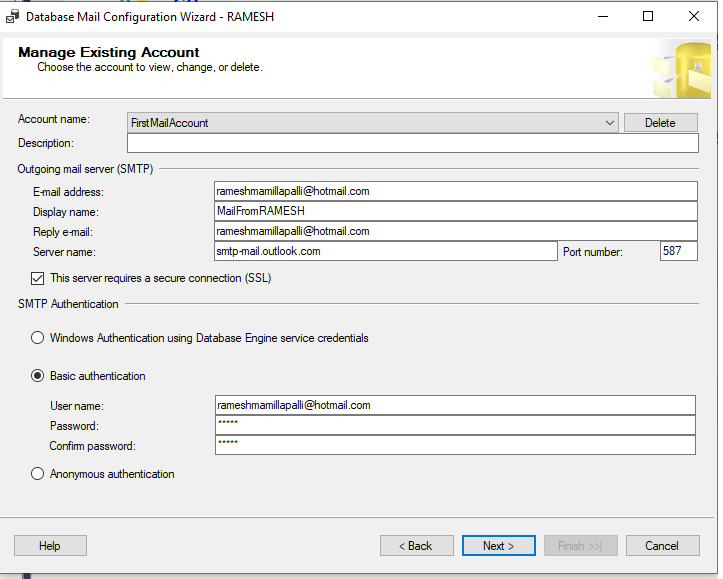
SQL Server 2005 Mail Configuration with Example.

Image
use master go sp_configure 'show advanced options' , 1 go reconfigure with override go sp_configure 'Database Mail XPs' , 1 --go --sp_configure 'SQL Mail XPs',0 go reconfigure go ------------------------- EXECUTE msdb.dbo.sysmail_add_account_sp @ account_name = 'DatabaseBackupStatus' , @ description = 'To know about the database backup status.' , @ email_address = 'a.rameshk@yahoo.com' , @ display_name = 'From DatabaseBackupStatus' , @ username = 'sa' , @ password = 'sa' , @ mailserver_name = '192.168.41.11' ----- EXECUTE msdb.dbo.sysmail_add_profile_sp @ profile_name = 'Profile for Database Backup' , @ description = 'Profile for Database Backup' --------- EXECUTE msdb.dbo.sysmail_add_profileaccount_sp @ profile_name = 'Profile for Database Backup' , @ account_name = 'DatabaseBackupStatus' , @ sequen...

.sqlwb is missing

After installing SQL Server 2005. I am unable to see the SQL Server Management Studio by clicking sqlwb from Run. Normally we can find this in the below default path C:\Program Files\Microsoft SQL Server\90\Tools\Binn\VSShell\Common7\IDE But in my installation i did not find sqlwb.exe file.So what i did was I copied IDE folder from other Server.And copied into my local. It is wroking perfectly for me. Thanks Ramesh.M

REVOKE VIEW ANY DATABASE TO Public

This command will stop users to view the Databases which are all existing in that particular server. REVOKE VIEW ANY DATABASE TO Public And want to give permission to the users(Other Logins) to see the database run this below command. GRANT VIEW ANY DATABASE TO Public Thanks Ramesh.M

Deny table Permission at Table Level:

Deny table Permission at Table Level: 1)Connect SQL Server through windows authentication at Sysadmin Level 2)Under Security Find Logins Eg: Under my Security there are logins like Prasad,Rameh,Siva 3)Now i decided I want to give Deny Table permission to Siva named Login 4)Now Click on Siva Login Properties->Go to Server Roles->Give Public->Don’t give any other Server roles. And especially Don’t give sysadmin server role and at the same time he should not be the owner of that database(db_owner) 5)Next open Query Analyzer run the below Script. use MCTS GO GRANT INSERT TO Siva GO use MCTS GO GRANT SELECT TO Siva GO use MCTS GO GRANT UPDATE TO Siva GO use MCTS GO DENY DELETE TO Siva--This Stops Dropping and Deleting 6) After running the query If siva next time login by using his credentials he can not run delete script. ----CREATING A ROLE AND ASSIGNING MEMBER TO IT. Here i am creating a database role which will not allow users to take a specific datab...

ALTER SCHEMA

In Adventure Works Sample database which is in SQL Server 2005 contains tables like HumanResources.Employee HumanResouces.Address Person.Address If we run the These tables without giving schema name we can not get the result. For Eg:SELECT * FROM Employee--Here we wont get results because we are not giving schema name here. If we write query then only we will get the result like SELECT * FROM HumanResources.Employee--We can get result here. Now i want to change the schema from HumanResources to dbo so that i can get the result without mentioning the Schema name before the table ALTER SCHEMA dbo TRANSFER HumanResources.Employee This statement changes Table from HumanResources.Employee to Employee. And we can get the result.

WITH NOCHECK/CHECK

You can add or enable the constraint without checking existing rows,but the constraint will be marked as not trusted. If you try to add or enable a constraint checking existing rows, and there is a row breaking the constraint,then you will not be able to add or enable the Constraint The below Example gives the Scenario: CREATE TABLE Books (Bookid INT IDENTITY(1,1) PRIMARY KEY,[Name] VARCHAR(25)) GO CREATE TABLE Authors (Sno INT IDENTITY(100,1),AuthorName VARCHAR(25),BookID INT) ---At this sage there no foreign key relation specified. INSERT Books ([Name]) VALUES('Ten Commandments') GO INSERT Authors (AuthorName,BookID) VALUES('Sydney',10)---Data is inserted in both the Table.No relations defined so far. ----Now i want to define the relation based on Existing Tables and Data First i ran this query to Create Foreign Key Relation. ALTER TABLE Authors ADD CONSTRAINT FK_Books_Bookid FOREIGN KEY(BookID) REFERENCES Books(BookID)--This is Giving me Error because alreay Data is ...

Getting the tables in all the databases at one time.

By running the below system stored procedure we can get the tables in all the database in the server sp_msforeachdb @command1='USE ?;SELECT * FROM sys.Tables'

Agent XPs Disabled

By running the Below query we can Enable Agent XP Enable: sp_configure 'show advanced options', 1; GO RECONFIGURE; GO sp_configure 'Agent XPs', 1; GO RECONFIGURE

How to Enable SQL Server Service Broker

Run this query ALTER DATABASE DataBaseName SET ENABLE_BROKER WITH ROLLBACK IMMEDIATE We can run the query without rollback statement. But it takes so much time. And we can find out the result by running this query.We can come to know that whether services have been restored or not. SELECT [name], is_broker_enabled FROM sys.databases WHERE [Name]='DatabaseName'

CAN NOT CONNECT TO WMI PROVIDER

I am trying to Connect to the Configurationg Manager and getting Error as: Can not Connect to WMI Provider Soluting for this is :Go to Command Prompt(cmd) Copy the below path and paste mofcomp "C:\Program Files\Microsoft SQL Server\90\Shared\sqlmgmproviderxpsp2up.mof" and Press Enter get the message like this. Microsoft (R) 32-bit MOF Compiler Version 5.1.2600.2180 Copyright (c) Microsoft Corp. 1997-2001. All rights reserved. Parsing MOF file: C:\Program Files\Microsoft SQL Server\90\Shared\sqlmgmprovider xpsp2up.mof MOF file has been successfully parsed Storing data in the repository... Done!

Common Solutions For DBA Automated Practices.

---This link will be useful for Common DBA automated Pracitces. http://code.msdn.microsoft.com/SQLExamples/Wiki/View.aspx?title=AutomatedDBA

The SQLSERVERAGENT Service On Local Computer started and then Stopped.Some Services Stop Automatically if they have no work to do.

I got this error while i am trying to start the SQLSERVERAGENT( SQLSERVER 2000 )from services(services.msc).If i right Click and trying to start the service i am getting this error. Solution for this is : Go to Properties of SQLServerAgent->Connections->Check SQL ServerAuthentication->Choose Logins from dropdownlist and he should be the member of sysadmin role.Click Ok. Then SQL Server Agent will start

Derived Query - GROUP BY

Here i am writing about derived query when we can use, and why I am writing a query which gives me results as Total Emails went to one particular Person(Here we can consider FirstName,LastName) And i am going to get these requirement by using GROUP BY Normally we have to use all columns whatever we mentioned in the SELECT statement.We have to mention all the columns in GROUP BY also. But i want to get the result using FirstName,LastName in GROUP BY. But it is not possible if you have many columns along with FirstName and LastName in Select Query.We have to give all the columnnames. But by using DerivedQuery we can use this Find below Query. SELECT Y.*,X.cnt FROM ( select count(1) cnt, ISnull(Table2.FirstName,'') as FirstName ,isnull(Table2.LastName,'') AS LastName FROM Table1 INNER JOIN Table2 ON Table1.emailID = Table2.EmailID LEFT OUTER JOIN Table3 AS Table3 ON Table1.EmailID=Table3.EmaiID WHERE 1=1 GROUP BY ISnull(Table2.FirstName,'') ,i...

STUFF and REPLACE.

STUFF (character expression, start, length, character expression) Eg: SELECT STUFF('ABCDEF', 2, 3, 'JKLMN') ResultSet AJKLMNEF What this STUFF Function will do is 1)Checks First two characters in the Character Expression(‘ABCDEF’) 2)Those two characters are BC in the Character Expression. 3)This starts count from B to D (Total Count 3) 4)So it removes BCD and Place JKLMN in that place. 5)So result set appears as AJKLMNEF REPLACE: REPLACE will also do the same with the Different way. REPLACE (string_expression1, string_expression2, string_expression3) Eg: SELECT REPLACE('ABCDEF','BCD','JKLMN') ResultSet: AJKLMNEF The way REPLACE Works is: 1)First it checks for the BCD in ABCDEF 2)And Remove BCD and Place JKLMN in the place of BCD 3)So output look like as AJKLMNEF

Schema Information Could not be retrieved because of the Following Error: "Lock request time out period Exceed"

I am getting this error while i am working with TeamFoundationSystem for Database Professionals.I am using this tool comparing schema Database to DatabaseProject. And i troubleshooted this problem if i click on Ques in Service Broker. So i ran SP_WHO command in that particular database. and find the blk column and KILL the session id.

Which schema is used in Which Object

--To find out which database schemas(dbo.data_reader,data_writer,lhi\ramesh) are used in which object We can find out that by running this query. SELECT SS.NAME,SO.NAME as ObjectName,SO.Type,SO.SCHEMA_ID FROM SYS.OBJECTS SO INNER JOIN SYS.SCHEMAS SS ON SO.SCHEMA_ID=SS.SCHEMA_ID WHERE SS.Name LIKE 'dbo' ORDER BY Type

Error MSB4018: The "SqlBuildTask" task failed unexpectedly.

While i am working with Team Foundationt System For Database Professionals 2008. By the time of building the Datbase Project i got this Error. Solution is restarting VS IDE.

SET ANSI_WARNINGS ON

This is a small example to understand the behaviour of SET ANSI_WARININGS option. ----Here SET ANSI_WARNINGS is ON SET ANSI_WARNINGS ON IF EXISTS(SELECT * FROM SYS.OBJECTS WHERE TYPE='U' AND [Name]='AnsiWarningsOn') BEGIN DROP TABLE AnsiWarningsOn END CREATE TABLE AnsiWarningsOn ([Name] VARCHAR(2)) INSERT INTO AnsiWarningsOn VALUES('Ramesh Mamillapalli') -----SET ANSI_WARNINGS is OFF SET ANSI_WARNINGS OFF IF EXISTS(SELECT * FROM SYS.OBJECTS WHERE TYPE='U' AND [Name]='AnsiWarningsOn') BEGIN DROP TABLE AnsiWarningsOn END CREATE TABLE AnsiWarningsOn ([Name] VARCHAR(2)) INSERT INTO AnsiWarningsOn VALUES('Ramesh Mamillapalli') SELECT * FROM AnsiWarningsOn

Behaviour of SET NUMERIC_ROUNDABORT and SET ARITHABORT

This specifies the level of Error Reporting generated when rounding in an expression causes a loss of precision ------------Here SET NUMERIC_ROUNDABORT ON and SET ARITHABORT OFF SET NOCOUNT ON PRINT 'SET NUMERIC_ROUNDABORT ON' PRINT 'SET ARITHABORT ON' SET NUMERIC_ROUNDABORT ON SET ARITHABORT ON GO DECLARE @Result DECIMAL(5,2), @Value_1 DECIMAL(5,4), @Value_2 DECIMAL(5,4) SET @Value_1=1.1234 SET @Value_2=1.1234 SELECT @Result=@Value_1+@Value_2 SELECT @Result -------Here SET NUMERIC_ROUNDABORT OFF and SET ARITHABORT ON SET NOCOUNT ON PRINT 'SET NUMERIC_ROUNDABORT OFF' PRINT 'SET ARITHABORT ON' SET NUMERIC_ROUNDABORT OFF SET ARITHABORT ON GO DECLARE @Result DECIMAL(5,2), @Value_1 DECIMAL(5,4), @Value_2 DECIMAL(5,4) SET @Value_1=1.1234 SET @Value_2=1.1234 SELECT @Result=@Value_1+@Value_2 SELECT @Result ------------------Here SET NUMERIC_ROUNDABORT OFF and SET ARITHABORT OFF SET NOCOUNT ON PRINT 'SET NUMERIC_ROUNDABORT OFF' PRINT 'SET ARITHABO...

BACKUP DATABASE script

USE master GO BACKUP DATABASE NorthWind TO DISK=N'D:\NorthwindBackup.BAK' WITH NAME=N'Northwind Database Full Backup',DESCRIPTION='Starting Point for Recovery',INIT,STATS=10