Posts

How to drop Certificate and master key from the server.

  /*   Follow below process to drop certificate and master key   */ use master ; go select     database_name = d . name ,     dek . encryptor_type ,     cert_name = c . name from sys . dm_database_encryption_keys dek left join sys . certificates c on dek . encryptor_thumbprint = c . thumbprint inner join sys . databases d on dek . database_id = d . database_id ; GO /*   First encryption off on the respective database */ USE master go ALTER DATABASE G SET ENCRYPTION OFF go /* drop the encryption key from the user database */ use G GO drop database encryption key GO /* drop the certificate from master database. */ USE master go DROP CERTIFICATE MyServerCert1 /* drop master key from master database */ DROP MASTER KEY
ALTER DATABASE ERROR IN MIRRORING.

Image
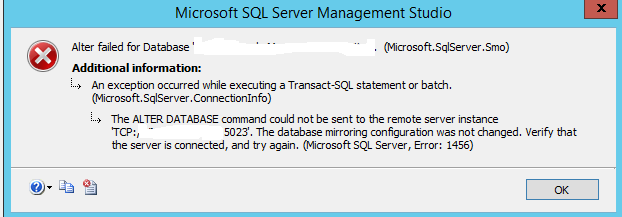
We got the below error in Mirroring when we are trying to add WITNESS server to the existing asynchronous operating mode. 1) In my environment PRINCIPAL and MIRROR servers are SQL Server 2014 Enterprise edition, but WITNESS server was SQL Server 2014 Express edition . 2) SQL Service accounts are running with NT Service\MSSQLSERVER account where as WITNESS server is running with another account( NT Service\MSSQL$VM ) . --> 3) But all these accounts  are communicating with  one another successfully. But if we are using the same DOMAIN account for all the instances(PRINCIPAL,MIRROR and WITNESS) there would be very less chance that we are going to get error. Work Around: The issue resolved when we STOP and RESTART the endpoint of  WITNESS server . Though it is a express edition this works fine for us. No need to hesitate even though you dont find end point  in server objects of express edition. SELECT * FROM sys.database_mirroring...

Invalid column name in last_local_recgen in Merge Agent Vs sp_vupgrade_replication

Image
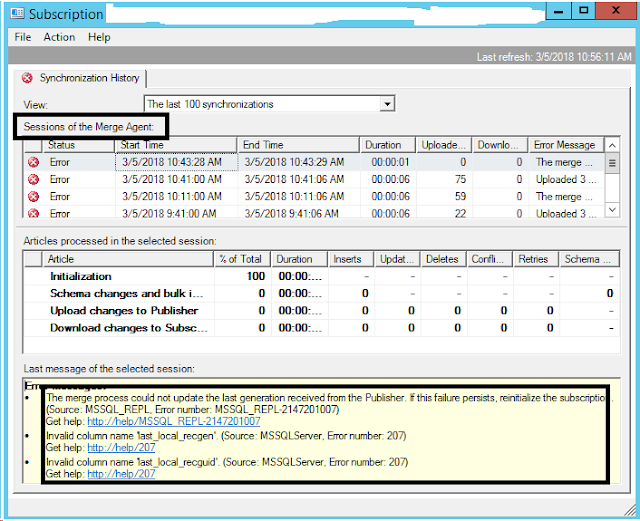
In one of my replication environment i got the below error in Merge agent on a Merge publication. The error message showing as "Invalid column name showing as last_local_recgen" This error occurs in my environment after we upgrade SQL Server environment from SQL Server 2014 SP1 to SQL Server 2014 SP2.  And whatever the Merge publications are already configured in this environment all those Merge publications went into error mode. We followed the below steps to resolve this issue. Work Around: 1) Capture .mdf and .ldf of all the user and system databases. 2) Take the backup of all user databases along with system databases including distribution database 3) Take backup of all the publication by generating script for those(Right click on publication -->Generate script) 4) Next run the below command USE master GO EXEC sp_configure 'allow updates',1 RECONFIGURE WITH OVERRIDE 5) Run the below system stored procedure in the master databases. US...

data file of MSDB database has been increasing(sys.sysxmitqueue)

Image
One day my service now dash board thrown an error saying as data file msdb consuming 67.5 GB out of 68 GB and only 500 mb is left out. My client sent a mail to me to find out a root cause of analysis.And he also mentioned and provided a query and said that there is a system table called    sys.sysxmitqueue is consuming nearly 67GB. When i try to find out this table under msdb database system tables we don't find this.  But realized this is a hidden table and the same has been found when we run the below query. USE msdb GO SELECT object_name(i.object_id) as objectName, i.[name] as indexName, sum(a.total_pages) as totalPages, sum(a.used_pages) as usedPages, sum(a.data_pages) as dataPages, (sum(a.total_pages) * 8) / 1024 as totalSpaceMB, (sum(a.used_pages) * 8) / 1024 as usedSpaceMB, (sum(a.data_pages) * 8) / 1024 as dataSpaceMB FROM sys.indexes i INNER JOIN sys.partitions p ON i.object_id = p.object_id AND i.index_id = p.index_id INNER JOIN sys.allocatio...

Filtering DATE in Where-Object in Powershell

Image
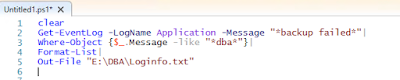
By using the below command, we can filter DATE on Get-Event log information.

Filtering Event Log information from Powershell.

Image
The below power shell query will filter data based on Message on multiple times.

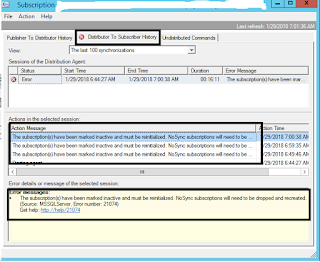
The subscription(s) have been marked inactive and must be reinitialized. No Sync subscriptions will need to be dropped and recreated.

Image
I got the below error in replication in production environment. This issue occurs at "Distribution Agent" Stage. In order to resolve this issue. We update the status of respective subscription of corresponding publication in Distribution Database. The error message as mentioned below "The subscription(s) have been marked inactive and must be reinitialized. No Sync subscriptions will need to be dropped and recreated." The update query below will make Subscription active. Run all these below queries in "Distribution" database. SELECT * FROM  MSSubscriptions WHERE Publication_ID=50 GO EXEC sp_replmonitorhelppublication GO BEGIN TRAN UPDATE MSSubscriptions SET Status=2 WHERE publication_id=50 COMMIT TRAN

LOG_REUSE_WAIT_DESC showing as 'REPLICATION' and also SNAPSHOT Publication Configured.

I would like to rephrase the sentence like this as "Size of the Transaction log of a database which is in Snapshot publication has been increasing and not able to shrink or truncate because log_reuse_wait_desc showing as REPLICATION" To work on this issue i google like anything every where i found log_reuse_wait_desc showing 'REPLICATION' but replication is not configured. After i put a certain amount of time on google i found a MSDN article ,only one article which described about this. And i want to document that in my own words in my blog. One day in my service now dash board i got a ticket saying as Transaction log file of a particular database has been increased. As a part of troubleshooting i check teh below things. Assume here my database name is TEST Findings: 1)  Test Database is in simple recovery model 2)  If i run the below command i found log_reuse_wait_desc showing as 'REPLICATION' 3) select log_reuse_wait,log_reuse_wait_ desc,* fr...

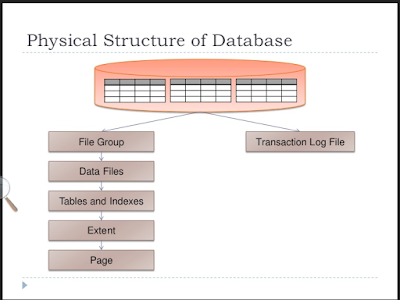
SQL Server Database Architecture

Image

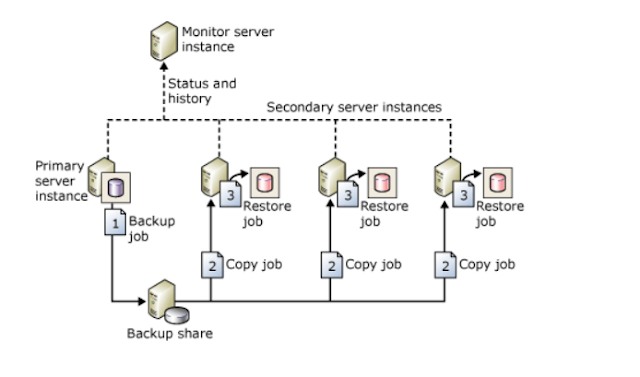
Log Shipping Architecture in SQL Server

Image
The below image will describe about Log shipping in SQL Server.

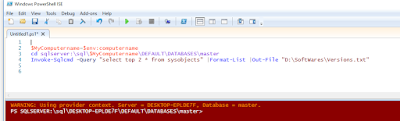
How to connect to SQL Server Named instance from Powershell

Image
You need to pass the values like below. When you are trying to connect to the SQL Server Named instance from Windows PowerShell. Dont give instance name here in this fomat like servername\instancename. Simply pass instance name alone.

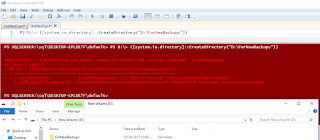
Folder creation in Windows by using Windows powershell

Image
To day i have done one more task with power shell command which creates a folder in D drive. I have written the script like below. Though you can find the error in the script, however it create a folder in the respective drive.

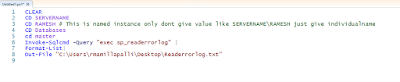
Connecting SQL Server from Windows Powershell

Image
This is my first effort connecting sql server through windows power shell command. I am able to access the SQL Server default instance with the below command and able to export or get those results to notepad.

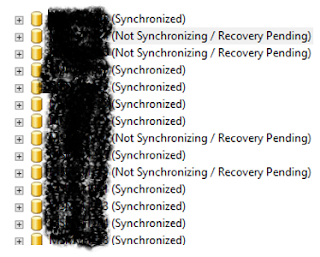
Databases status showing as Not Synchronizing/Recovery Pending in SQL Server Always On Secondary replica.

Image
Recently i have come across one issue in my environment where i found databases have gone into Not Synchronizing/Recovery pending state in one of the secondary replicas as shown given below. In though above image there are 4 databases have gone into NotSynchronizing/ Recovery Pending state. However i am going explain here about one database. Check the same database status Under Availability Groups-->Under Avaiability Databases. If you see the status of the database has shown like this If you see the database status shown as in Red. Now runt the below command in Secondary replica. ALTER DATABSE  DatabaseName SET HADR OFF Once you run this command you can see the database status will change to Warning mode from error mode as shown below. At the same time you observer same database status in under databases it will change to restoring mode from Not Synchronizing /Recovery pending state to Restoring mode as shown below. Now you right click on the stat...

DATABASE LEVEL PERMISSIONS ON SQL SERVER

Image
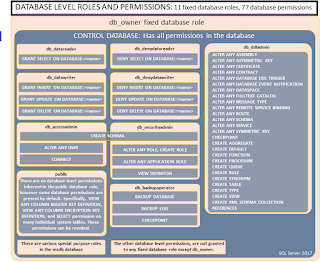
The below image will explain you about Database level permissions at database level. Extracted from BOL.

Getting logins account information from the server who are having sysadmin Privilege

/****** Getting logins account information  from the server who are having sysadmin Privilege. But we can use this for other servers also if need. Script Date: 10/4/2017 Author: Ramesh. M ******/ SET NOCOUNT ON USE master go DECLARE @Table TABLE (ServerRole VARCHAR(50),[Member] VARCHAR(100),MemberSID VARCHAR(1000)) DECLARE @Table1 TABLE (Sno INT IDENTITY(1,1),Name VARCHAR(2000)) DECLARE @CaptureLoop TABLE (accountname varchar(200),types varchar(200),privelege varchar(100), MappedLogin varchar(100),PermissionPath VARCHAR(100)) INSERT INTO @Table1 (Name) SELECT NAME FROM sys.server_principals WHERE type IN('g'); DECLARE @i int declare @Count INT declare @Catchvalue VARCHAR(50) SET @i=0 SELECT @Count=COUNT(*) FROM sys.server_principals WHERE type IN('g') --PRINT @Count INSERT INTO @Table (ServerRole,[Member],MemberSID) exec sp_helpsrvrolemember 'sysadmin' WHILE @I<@Count BEGIN   set @i=@i+1   SELECT @Catchvalue=Name   FROM @...