Posts

Msg 22048, Level 16, State 1, Line 0 xp_create_subdir() returned error 183, 'Cannot create a file when that file already exists.'

Image
I faced this problem when i am handling Database backups with Ola Hallengren backup scripts. First i am under impression that there is a duplicate folder or duplicate file in the respective paths, But it is not so.  The issue resolved after i have added SQL Server Databse Engine and SQL Server Agent service accounts to that specific folder under security and i have give full control to those service account. After that the issue got resolved.
Export Powershell results an Excel sheet.

The below code will export to information to an excel sheet in a proper column and table format. cls $ToDayDate=Get-Date $After=[datetime]::Today.AddDays(-7) $Servers=@("RAMESH","RAMESH\UAT") $Servers| ForEach-Object{ $InstanceName=$_ Get-DBAErrorLog -SQLInstance $InstanceName ` -Before $ToDayDate -After $After | Where-Object {($_.Text -like "*register a Service Principal Name (SPN)*") -or ($_.Text -like "*taking longer than*") ` -or($_.Text -like "*login failed*") } }| Export-Csv "C:\Users\hi\Desktop\Test\Analysis.csv" -NoTypeInformation

OLAHALLENGREN OUTPUT FILE PATH INFO

The below parameter you need to change in the Ola script and Execute his maintenance script. SET @OutputFileDirectory = 'G:\Backups\Siva'  This path will be automatically generated by Ola script. G:\Backups\Siva\DatabaseBackup_FULL_ $(ESCAPE_SQUOTE(JOBID))_$(ESCAPE_SQUOTE(STEPID))_$(ESCAPE_SQUOTE(DATE))_$(ESCAPE_SQUOTE(TIME)).txt The below powershell query will change teh output file path of FULL,DIFF,LOG,INDEX and INTEGRITY check backups. Backup jobs are created by Ollahallengren script. cls $InstanceName = 'RAMESH\PROD' $FullPath = 'D:\ramesh\mahesh\USER_DATABASES_FULL_$(ESCAPE_SQUOTE(JOBID))_$(ESCAPE_SQUOTE(STEPID))_$(ESCAPE_SQUOTE(DATE))_$(ESCAPE_SQUOTE(TIME)).txt' $DIFFPath = 'D:\ramesh\mahesh\USER_DATABASES_DIFF_$(ESCAPE_SQUOTE(JOBID))_$(ESCAPE_SQUOTE(STEPID))_$(ESCAPE_SQUOTE(DATE))_$(ESCAPE_SQUOTE(TIME)).txt' $LOGPath = 'D:\ramesh\mahesh\USER_DATABASES_LOG_$(ESCAPE_SQUOTE(JOBID))_$(ESCAPE_SQUOTE(STEPID))_$(ESCAPE_SQUOTE(DATE))_$(ESCAPE_S...

Creating database mail with DBA TOOLS powershell script

The below query will configure database profile and account on multiple sql server named instance. cls $instanceNames = @( "defaultinstance" , "named\instance1" , "named\instance2" ) $instanceNames | ForEach-Object { $InstanceName = $_ New-DbaDbMailAccount ` -SQLinstance $InstanceName ` -Name "DBHealth" ` -DisplayName "AOAG Health Failed" ` -Description "DatbaseHealthCheck" ` -EmailAddress "support@sql.com" ` -ReplyToAddress "support@sql.com" ` -MailServer "mailserveramehere" ` -Force New-DbaDbMailProfile ` -SqlInstance $InstanceName ` -MailAccountName "DBHealth" ` -Name "DBHealthProfile" ` }

Creating SQL Server agent job step in SQL Server through Powershell.

# creating sql server agent step in sql server through powershell. cls Import-Module sqlps -DisableNameChecking $instanceName = "RAMESH" #Provide sql server named instance or default instance here $server = New-Object ` -TypeName Microsoft.SqlServer.Management.Smo.Server ` -ArgumentList $instanceName $getJobs = $server .JobServer.Jobs $getJobs | ForEach -Object{ $IndividualJob = $_ #now let's add a simple T-SQL Job Step $jobStep = New-Object Microsoft.SqlServer.Management.Smo.Agent.JobStep( $IndividualJob , "TestStep" ) #TestStep is a step name. $jobStep .Subsystem = [Microsoft.SqlServer.Management.Smo.Agent.AgentSubSystem] :: TransactSql $result = $jobStep .Command = "SELECT GETDATE()" $jobStep .OnSuccessAction = [Microsoft.SqlServer.Management.Smo.Agent.StepCompletionAction] :: GoToNextStep $jobStep .OnFailAction = [Microsoft.SqlServer.Management.Smo.Agent.StepCompletionAction] :: QuitWithFailure $jobStep .ID=1 $jobStep .Create() } x...

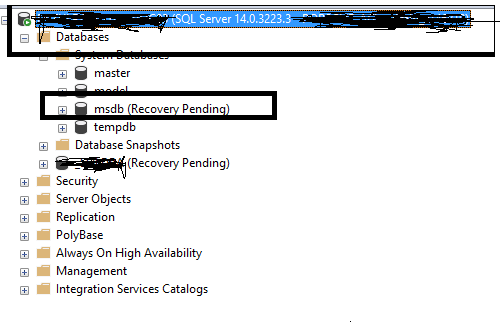
msdb database is in Recovery Pending state.

Image
Suddenly one of my SQL Server named instances system database named msdb database gone into Recovery Pending state as shown in the below image. Don't worry just check the data and log file of the database  by running SELECT * FROM sys.master_files, if you can find the data and log file of the databases are in same path , your job would be very easy , just run the below command. use master go ALTER DATABASE msdb SET ONLINE The above command will bring the database online.

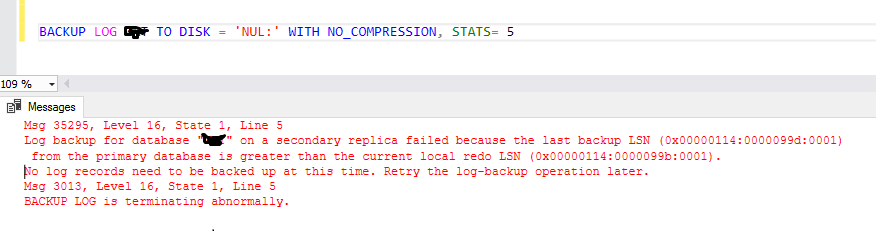
Msg 35295, Level 16, State 1, Line 5

Image
I got the below error in the SECONDARY replica transaction log backup jobs.  To resolve this issue i have removed respective database from the availability group of PRIMARY REPLICA database, if you do this automatically in the SECONDARY replica the database goes into RESTORING mode, then you can even delete this database from the secondary replica and go to PRIMARY replica and start database adding again. Then it will again to add to availability databases of PRIMARY and secondary.

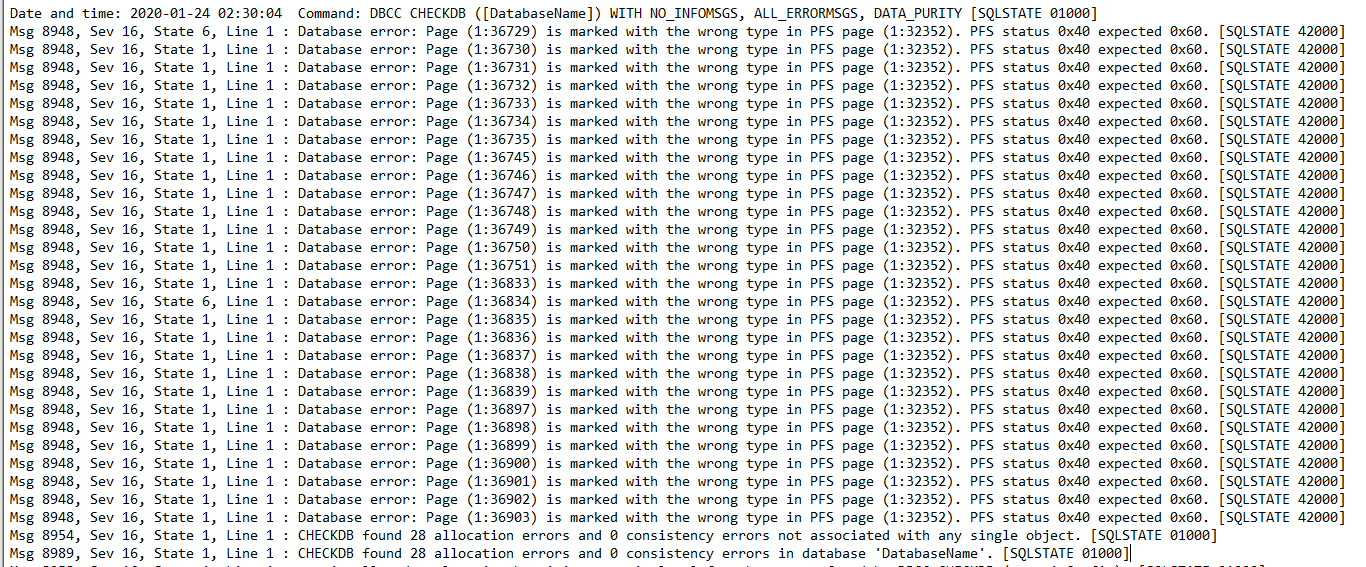
DBCC INTEGRITY CHECK ERROR:Msg 8948, Sev 16, State 6, Line 1 : Database error: Page (1:36729) is marked with the wrong type in PFS page (1:32352). PFS status 0x40 expected 0x60. [SQLSTATE 42000]

Image
I got the below when on one of the Always on Databases while we are running DBCC INTEGRITY CHECK job. We need to bring the database to single user mode and need to execute REPAIR_ALLOW_DATA_LOSS. However this is not going to delete any data. ( https://www.sqlskills.com/blogs/paul/pfs-corruption-after-upgrading-from-sql-server-2014/ )

Getting SQL Server Agent Job status through Powershell

cls #Import sql serer module Import-Module sqlps -DisableNameChecking #Provide instance name $ServerNames = "SQLServerNamedInstanceName" $Server = New-Object ` -TypeName Microsoft.SQLServer.Management.Smo.Server ` -ArgumentList $ServerNames $Jobs = $Server . JobServer . Jobs $Jobs | Select-Object LastRunOutcome , OriginatingServer , Name , OwnerLoginName , LastRunDate , CurrentRunStatus , NextRunDate | Format-Table   -----On multiple instances. cls #Import sql serer module Import-Module sqlps -DisableNameChecking #Provide instance name $ServerNames = @( "Server1" , "Server2" , "Server3" ) $ServerNames | ForEach-Object { $ComputerName = $_ $Server = New-Object ` -TypeName Microsoft.SQLServer.Management.Smo.Server ` -ArgumentList $ComputerName $Jobs = $Server . JobServer . Jobs $Jobs | Select-Object LastRunOutcome , OriginatingServer , Name , OwnerLoginName , LastRunDate , CurrentRun...

ConvertTo-Html in Powershell

# This PowerShell script gives information about the events of ERROR,CRITICAL and WARNING, and this provides today data alone.     cls $Computername = $env:COMPUTERNAME   $a = get-date $month = $a . tostring( "MM" ) $day = $a . tostring( "dd" ) $year = $a . tostring( "yyyy" ) $OutFile = "D:\ServerList\" + $Computername + "_Error_Warning_Critical.html" $csname = $Computername + "_Warning_Error_Critical" Get-WinEvent ` -LogName Application , System | Select-Object @{Name = "Service" ;expression = { $_ . ProviderName}} , TimeCreated , Id , @{Name = "Level" ;expression = { $_ . LevelDisplayName}} , Message | Where-Object {(( $_ . Level -eq 'warning' ) -or ( $_ . Level -eq 'Error' ) -or ( $_ . Level -eq 'Critical' )) -and ( $_ . Timecreated -like "* $month / $day / $year...

When the SQL Server Services Started and Stopped in Windows server

<# Events that occur after stopping services. #19032:SQL Trace was stopped due to server shutdown. Trace ID = '1'. This is an informational message only; no user action is required. #6527.NET Framework runtime has been stopped. 17148.NET Framework runtime has been stopped. 17148SQL Server is terminating in response to a 'stop' request from Service Control Manager. This is an informational message only. No user action is required. 102SQLServerAgent service successfully stopped. 15457Configuration option 'Agent XPs' changed from 1 to 0. Run the RECONFIGURE statement to install. #> clear Get-EventLog -LogName Application | Where-Object { $_ . EventID -in ( 19032 , 6527 , 17148 , 102 , 15457 )} | Format-Table -AutoSize Sort-Object Time -Descending <# 3408:Recovery is complete. This is an informational message only. No user action is required. 9688:Service Broker manager has started. 17137:Starting up database ...

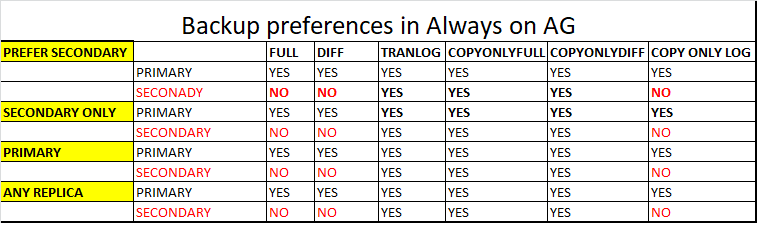
Backup preferences in Always on AG

Image

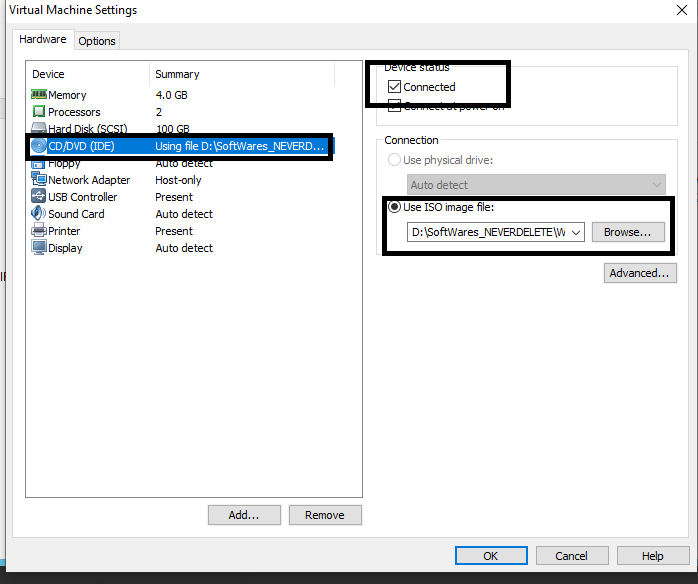
Accessing out side folder from VM

Image
If we want to access folder outside of VM, we can access it by using the below check box.

tempdb monitoring queries.

--Script to find historic tempdb usage by session. SELECT TOP 5 * FROM sys.dm_db_task_space_usage WHERE session_id > 50 ORDER BY user_objects_alloc_page_count + internal_objects_alloc_page_count DESC ; -- Finding the top 5 sessions running tasks that use tempdb SELECT * FROM sys.dm_db_session_space_usage WHERE session_id > 50 ORDER BY user_objects_alloc_page_count + internal_objects_alloc_page_count DESC ; -- Script to total tempdb usage by type across all files. SELECT SUM(user_object_reserved_page_count) AS user_object_pages, SUM(internal_object_reserved_page_count) AS internal_object_pages, SUM(version_store_reserved_page_count) AS version_store_pages, total_in_use_pages = SUM(user_object_reserved_page_count) + SUM(internal_object_reserved_page_count) + SUM(version_store_reserved_page_count), SUM(unallocated_extent_page_count) AS total_free_pages FROM sys.dm_db_file_space_usage ; --- To get text and plan SELECT session_id, text, query_plan FROM sys...

SQL Server Services and cluster info along with last reboot time of Server

The below powershell script provide the information of when the server was last rebooted and the status of SQL Server Services and Cluster resources if the sql server is clustered environment. clear $servernames = "C:\ServerList\ServerList.txt" Get-Content $servernames | ForEach-Object { $ComputerName = $_ $S = Get-WmiObject ` -Class Win32_SystemServices ` -ComputerName $ComputerName IF ( $S | Select PartComponent | Where-Object { $_ -like "*ClusSvc*" }) { Write-OutPut " $ComputerName is clustered" Invoke-command ` -ComputerName $ComputerName ` -ScriptBlock { Get-WmiObject Win32_operatingsystem | Select-Object CSName , @{Label = 'LastBootTime' ;EXPRESSION = { $_ . ConverttoDateTime( $_ . lastbootuptime)}} } Invoke-Command ` -ComputerName $ComputerName ` -ScriptBlock { Get-Service -Name "*sql*" } | Format-Table -AutoSize Invoke-Command ` -ComputerName ...