database files movement from one drive to another drive in sql server
Get link
Facebook
X
Pinterest
Email
Other Apps
1) Capture the .mdf and ldf file namesof that particular datbase to which you want tomoveSELECT*FROM sys.master_files
2) Ensure that you have latest .BAK file available forrollback plan
3) Take that particular database alone into OFFLINE
ALTERDATABASE database_name
SET OFFLINE
4) Move the files tonewlocation5) Run the below command make changes atsystem catlogue level
USE master
GOALTERDATABASE AdventureWorks2012
MODIFY FILE( NAME = AdventureWorks2012_Log,
FILENAME ='C:\NewLoc\AdventureWorks2012_Log.ldf');
GOALTERDATABASE AdventureWorks2012
MODIFY FILE ( NAME = AdventureWorks2012_Data,
FILENAME ='C:\NewLoc\AdventureWorks2012_data.mdf');
6) Bring the database ONLINE
ALTERDATABASE database_name
SET ONLINE
7)Once the database came online run the below commmand to chek whether the new path appearing at catlogue levelSELECT name, physical_name AS CurrentLocation, state_desc
FROM sys.master_files
WHERE database_id = DB_ID(N'<database_name>');
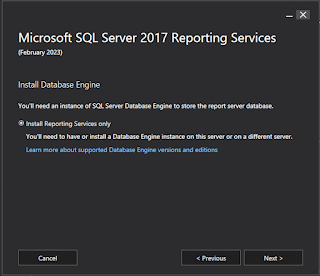
I am configured SSRS on Always on Environment. Here I have NODE1 and NODE2 servers, NODE1 is primary replica and NODE2 is secondary replica. I have installed SSRS on both the nodes after downloading setup file from the internet. The below images will explain about how to configure things from "SSRS Configuration Manager". Images below are self explanatory.
We can run below PowerShell and SQL Server commands when we want to find ou when the failover has happened. cls Get-winEvent -ComputerName ListerNameHere -filterHashTable @{logname = 'Microsoft-Windows-FailoverClustering/Operational' ; id = 1641 } | Where-Object { $_ . Timecreated -like '*05/09/2020*' } | Format-Table -AutoSize -Wrap <# 35201-->timeout alert run this by changing -LogName to System 41-->41 is power shutdown run this in system #> clear Get-EventLog -LogName Application -After ( Get-Date ) . AddHours( -48 ) | Where-Object { $_ . EventID -in ( 1100 , 1074 , 35201,41,1561,7024,1135,7032,1146 )} | Format-Table -AutoSize -Wrap cls Get-EventLog ` -LogName System |Where-Object{$_.EventID -in (1054,1053,1055,1138,1141,1142,5140,5142,1559,1560,1563,1588,1068,5144,1562,5143,5168,1564,1177)}|Format-Table -AutoSize -Wrap EXEC sp_readerrorlog 0,1,'lease worker' EXEC sp_readerrorlog 0,1,'...


Comments