Posts

LOG FILE OF PRINCIPAL DATABASE IS GROWING ABNORMALLY IN MIRRORING.

Whenever there is any active transactions or REBUILD INDEXES activities are going there is a chance of log file growth in that particular principal database where that database has been participated in Mirroring. It means whenever Mirror database falls behind Principal please do the below steps.And if the amount of ACTIVE LOG is growing abnormally we can do the below steps 1) Stop Database Mirroring 2) Take the log backup that truncates the log and restore that in Mirroring WITH NORECOVERY option. 3)And RESTART the mirroing ---How to find how many databases are in mirroring state. SELECT A. name , CASE      WHEN B.mirroring_state is NULL THEN 'Mirroring not configured'      ELSE 'Mirroring configured' END as MirroringState FROM sys.databases A INNER JOIN sys.database_mirroring B ON A.database_id=B.database_id WHERE a.database_id > 4 ORDER BY A. NAME --How to check...

How to bring SQL Server Instance in Single user mode and Connect as Single User

Image
1) Go to SQL Server configuration Manager and click on respective instance. In my case it is SQL Server default instance. 2)Right click on Properties go to "Start Up Parameters" and "Specify a Startup Parameter" and in that window type "-m" and click on Add button.Then that parameter will appear under "Existing Parameters" as shown below. 3) Click on "Ok" and message will pop up as restart the services here. Ensure that "SQL Server Agent is also stopeed before you are connectin to SQL Server instance. 4) After restarting the sql server service through stop and start try to connect "SQL Server Management Studio". Here please observe few points carefully a) Go to run and give value "ssms" and " SQL Server Management studio will appear like below. And follow the below instructions b) DONT CLICK ON CONNECT button now. Instead click on "CANCEL" button. After that click on "New...

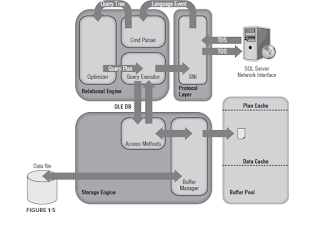
SQL SERVER ARCHITECTURE

Image

INSERTING HUGE DATA in a Table to check PerformanceIssues.

CREATE TABLE TblNumbers (ID int identity(1,1) primary key,Num INT) go ;WITH N AS (     select 0 as Num  union all  select 0  union all  select 0  union all  select 0  union all  select 0  union all     select 0  union all  select 0  union all  select 0  union all  select 0  union all  select 0--10 ) ,Numbers AS ( SELECT ROW_NUMBER()OVER(ORDER BY (SELECT 1))AS Rn FROM N N1,--10rows N N2,-->10*10=100 N N3,-->10*10*10=1000 N N4,---->10*10*10*10=10000 N N5,------>10*10*10*10*10=100000 N N6,--10*10*10*10*10*10=1000000 N N7,--10*10*10*10*10*10*10=10000 000 N N8, N N9 ) INSERT INTO TblNumbers (Num) SELECT Rn FROM Numbers SELECT * FROM TblNumbers

How to avoid KEYLOOKUP operator

Image
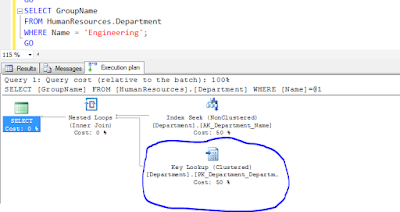
The Key Lookup Operator is a bookmark look up on a table with a clustered index. This Key Lookup can be quite expensive, so we should try to eliminate them when you can. Of course we should also need to consider your overall work load, and how often the query with the key lookup is executed. Key Lookup occurs when you have an index seek against a table ,But your query requires   additional columns that are not in that index. This causes SQL Server to have to go back and retrieve those extra columns you can see the example here.   One way to reduce or eliminate Key Lookup is to remove some or all of the columns that are causing   the Key Lookup from the query. This can easily break your application. So don’t do this until you are sure that these columns are necessary. And the second method is creating covering index   on a column of the table in SELECT list. A covering index is simply a non-clustered index   that has all the columns needed t...

AUTO_CREATE_STATISTICS NOT USEFUL FOR CREATING STASTICS ON INDEXES

Image
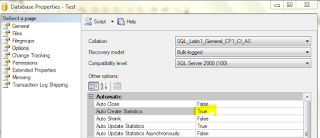
AUTO_CREATE_STATISTICS option does not determine whether statistics get created for indexes. This option also does not generate filtered statistics.It applies strictly to single-column statistics for the full table. That is why even though AUTO_CREATE_STATISTICS enable on database level. We need to again update statistics for the Indexes. If you observed below table i have create a table with 3 columns and I ran the 3 different queries with by using 3 different columns in WHERE condition. And statistics created automatically created because of AUTO_CREATE_STATISTICS option. But this option will not create statistics on Indexes that is why we will run SP_UPDATESTATS once we did REBUILD indexes.

How to find the users in a group login

Hi, By running the below query we can find out that who are the users in a that group. use master go EXEC xp_logininfo @acctname = 'AOINTL\USCareUsers' , @option = 'members'  

How to move logins from one instance to another instance in SQL Server

Connect the instance that you need to move the logins. And run the below script in master database. Because logins are server level objects USE master GO IF OBJECT_ID ('sp_hexadecimal') IS NOT NULL   DROP PROCEDURE sp_hexadecimal GO CREATE PROCEDURE sp_hexadecimal     @binvalue varbinary(256),     @hexvalue varchar (514) OUTPUT AS DECLARE @charvalue varchar (514) DECLARE @i int DECLARE @length int DECLARE @hexstring char(16) SELECT @charvalue = '0x' SELECT @i = 1 SELECT @length = DATALENGTH (@binvalue) SELECT @hexstring = '0123456789ABCDEF' WHILE (@i <= @length) BEGIN   DECLARE @tempint int   DECLARE @firstint int   DECLARE @secondint int   SELECT @tempint = CONVERT(int, SUBSTRING(@binvalue,@i,1))   SELECT @firstint = FLOOR(@tempint/16)   SELECT @secondint = @tempint - (@firstint*16)   SELECT @charvalue = @charvalue +     SUBSTRING(@hexstring, @firstint+1, 1) +     SUBSTRING(@hexstri...

OLTP vs OLAP

Difference between OLTP and OLAP Datbases. Difference OLTP System   OLAP System   Source of data Operational data; OLTPs are the original source of the data. Consolidation data; OLAP data comes from the various OLTP Databases Purpose of data To control and run fundamental business tasks To help with planning, problem solving, and decision support What the data Reveals a snapshot of ongoing business processes Multi-dimensional views of various kinds of business activities Inserts and Updates Short and fast inserts and updates initiated by end users Periodic long-running batch jobs refresh the data Queries Relatively standardized and simple queries Returning relatively few records Often complex queries involving aggregations Processing Speed Typically very fast Depends on the amount of data involved; batch data refreshes and complex queries m...

Error: 3041, Severity: 16, State: 1 ;Backup detected log corruption in database DatabaseName. Context is FirstSector

There is a Transaction log backup scheduled on my production server. On one bad day the Transaction log backup sql agent job throwing error and the error was like below. And I have found this error in the ERROR path(Eg:C:\Program Files\Microsoft SQL Server\MSSQL10_50.MSSQLSERVER\MSSQL\Log\ERRORLOG)   Error: 3041 , Severity: 16 , State: 1    Backup detected log corruption in database DatabaseName . Context is FirstSector . LogFile: 2 'E:\MSSQL\DATA\DatabaseName.ldf' VLF SeqNo: x541af1 VLFBase: x42e20000 LogBlockOffset: x43785c00 SectorStatus: 2 LogBlock . StartLsn . SeqNo: x6320656c LogBlock . StartLsn . Blk: x6f6e6e61 Size: x656e And the steps I have done to fix this issue is: However Transaction log backup is not working. 1) Take the database full backup 2) Change the Data base recovery model from FULL to Simple( breaking the log backup chain and removing the requirement that the damaged portion of log must be backed up) 3) Run CHECKP...

How to find which session is causing lock

By running the below query we can find that which query is causing to the locking. SELECT lok.resource_type ,lok.resource_subtype ,DB_NAME(lok.resource_database_id) ,lok.resource_description ,lok.resource_associated_entity_id ,lok.resource_lock_partition ,lok.request_mode ,lok.request_type ,lok.request_status ,lok.request_owner_type ,lok.request_owner_id ,lok.lock_owner_address ,wat.waiting_task_address ,wat.session_id ,wat.exec_context_id ,wat.wait_duration_ms ,wat.wait_type ,wat.resource_address ,wat.blocking_task_address ,wat.blocking_session_id ,wat.blocking_exec_context_id ,wat.resource_description FROM sys.dm_tran_locks lok JOIN sys.dm_os_waiting_tasks wat ON lok.lock_owner_address = wat.resource_address    

How to change the server name of SQL Server:

Image
If you are trying to change the name of the server in a production environment you need to look at the below steps. Please check whether Replication, Log shipping, Mirroring is installed. If that is the case, you should be cautious before you are running this script. You need to disable all these before you are going to run the below command. And also ensure that you have a backup of all the databases available. And follow the below steps. If you are trying to change the "Default Instance" you can run the below command.  

DIFFERENT ISOLATION LEVELS AND ITS BEHAVIOUR.

READ UNCOMMITTED is the least restrictive isolation level because it ignores locks placed by other transactions. Transactions executing under READ UNCOMMITTED can read modified data values that have not yet been committed by other transactions; these are called "dirty" reads. READ COMMITTED is the default isolation level for SQL Server . It prevents dirty reads by specifying that statements cannot read data values that have been modified but not yet committed by other transactions. Other transactions can still modify, insert, or delete data between executions of individual statements within the current transaction, resulting in non-repeatable reads, or "phantom" data. REPEATABLE READ is a more restrictive isolation leve l than READ COMMITTED. It encompasses READ COMMITTED and additionally specifies that no other transactions can modify or delete data that has been read by the current transaction until the current transaction commits. Concurrency is lowe...

CTRL+R not working in SQL Server 2012 and 2014 Management tool

Image
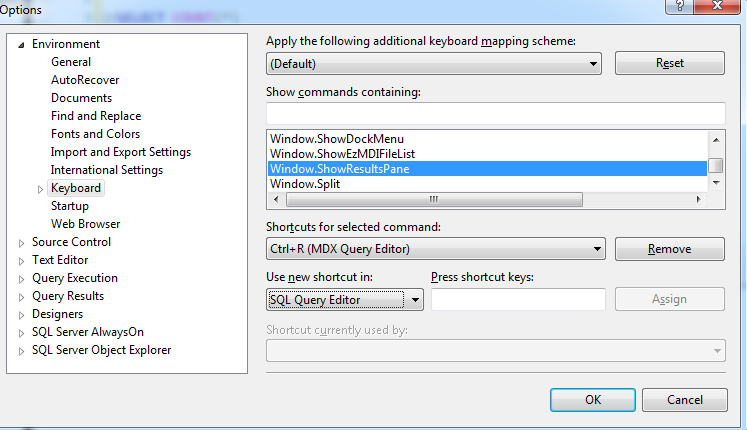
Please follow the below instructions. Select "Tools", "Customize..." - Click "Keyboard..." - In the list window, scroll down and select "Window.ShowResultsPane" - Under "Use new shortcut in:", select "SQL Query Editor" - Place your cursor in the "Press shortcut keys:" input area and press Ctrl+R - Click "Assign", then "OK"  

SQL Data page and Extent.

Image
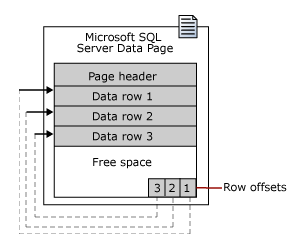
Data Page :   The size of the data page is 8KB. Data rows are put on the page serially, starting immediately after the header. A row offset table starts at the end of the page. And each row offset table contains one entry for each row on the page. Each entry records how far the first byte of the row is from the start of the page. The entries in the row offset table are in reverse sequence from the sequence of the rows on the page. Extent :   Extents are the basic unit in which space is managed. An extent is eight contiguous pages, or 64 KB. This means SQL Server database have 16 extents per megabyte (1MB). To make its space allocation efficient SQL Server does not allocate whole extents to table with small amounts of data. SQL Server has two types of events.   1 Page -> 8KB   8 Pages -> 8 * 8 = 64KB ( One Extent )     16 * 64 = 1024KB ( 1MB )    

RESTORATION OF ReportServer and ReportServerTempdb

Image
Hi, I just want to share one of my experiences as DBA. One day my boss gave me a task of restoration of ‘Reportserver’ and ‘ReportServerTempdb’ databases. This is in SQL Server 2008R2. What I did is I tried to restore the database and I got an error saying that “The database is already in Use”. So I thought there might be other sessions are open on this database. So I ran sp_who2 stored procedure and kill all  the sessions which are connecting to ‘Reportserver’ database and try to restore the database as usual. But this time also I faced the same problem. So I thought this time I will take the database in single user mode and try to restore the same. I failed in this attempt also. What I realized after some time was “Reporting Services” are running and this is stopping me to restore the database. I stopped this “Reporting Service” and restored the two databases with in one minute After few days I got an error on "ReportServerTempdb" database the error details are as bel...

sp_configure for max server memory restriction.

Image
I came across below errors in my event viewer log after installing SQL Server. Error:1 Error: 17887, Severity: 10, State: 1. (Params:). The error is printed in terse mode because there was error during formatting. Tracing, ETW, notifications etc are skipped. Error:2 There was a memory allocation failure during connection establishment. Reduce nonessential memory load, or increase system memory. The connection has been closed. [CLIENT: ] Error:3 SQL Server was unable to run a new system task, either because there is insufficient memory or the number of configured sessions exceeds the maximum allowed in the server. Verify that the server has adequate memory. Use sp_configure with option 'user connections' to check the maximum number of user connections allowed. Use sys.dm_exec_sessions to check the current number of sessions, including user processes. Error:4 BRKR TASK: Operating system error Exception 0x1 encountered. Error:5 Error: 17300, Severity: 16, State: 1...

Replication Agents in SQL Server 2008.

SQL Server Agent jobs are key components of replication. A number of SQL Agent jobs are created by replication. 1) Snapshot Agent: The Snapshot Agent is a SQL Agent job that takes and applies the snapshot either for setting up transactional or merge replication or for a snapshot replication. 2) Log Reader Agent: The Log Reader Agent is the SQL Agent job that reads the transaction log on the publisher and records the transactions for each article being published into the distribution database. 3) Distribution Agent: The Distribution agent is the SQL Agent job that reads the transactions written to the distribution database and applies them to the subscribing database. 4) Merge Agent: The Merge agent is the SQL Agent job that manages activities of Merge replication. 5) Other Agents: You may come across quite a few other SQL Agent Jobs, as described in the following list a) Queue Reader Agent b) History Agent c) Distribution Cleanup d) Expired subscription cleanup e) Repl...

SET STATISTICS IO ON/OFF Command

Let us look at the STATISTICS IO output for the example of the query. This is a session level setting STATISTICS IO provides you with I/O related information for the statement you run. DBCC DROPCLEANBUFFERS GO SET STATISTICS IO ON--This is session level command GO SELECT SalesOrderID,OrderDate,CustomerID FROM dbo.New_SalesOrderHeader GO SET STATISTICS IO OFF If we run the above command in AdventureWorks2008 database we will get the results as below Table ‘New_SalesOrderHeader’. Scan count 1, logical reads 799, physical reads 0, read-ahead reads 798, lob logical reads 0, lob physical reads 0, lob read-ahead reads 0. Scan Count: Scan count tells you that how many times the table was accessed for this query. Logical Reads: This counter indicates that how many pages were read from data cached. In this case total 799 pages read from data cache. PhysicalReads: This counter indicates that the number pages read from the disk here it is 0 that means there is no physical read from the ...

CLEARING DNS CACHE

ipconfig /release ipconfig /flushdns ipconfig /renew

Optimizing SQL Server CPU Performance.

I am trying to add some more additional explanation to the below points. A) SQL Server Access Methods: (1) Index Search/Per Second: Number of index searches. Index searches are used to start range scans, single index record fetches, and to reposition within an index. Index searches are preferable to index and table scans.  For OLTP applications, optimize for more index searches and less scans (preferably, 1 full scan for every 1000 index searches). Index and table scans are expensive I/O operations. (2) Full Scans/Sec : This counter monitors the number of full scans on base tables or indexes. Values greater than 1 or 2 indicate that we are having table / Index page scans. If we see high CPU then we need to investigate this counter, otherwise if the full scans are on small tables we can ignore this counter.  A few of the main causes of high Full Scans/sec are • Missing indexes • Too many rows requested Queries with missing indexes or too many rows requested w...