Posts

READONLY ROUTING in Always On.

Image
This query will tell you how to handle READONLY ROUTING in AlwaysOn. ALTER AVAILABILITY GROUP AvailabilityGroupName MODIFY REPLICA ON N 'NODE1' WITH (SECONDARY_ROLE (ALLOW_CONNECTIONS = READ_ONLY)); ALTER AVAILABILITY GROUP AvailabilityGroupName MODIFY REPLICA ON N 'NODE1' WITH (SECONDARY_ROLE (READ_ONLY_ROUTING_URL = N 'TCP://NODE1.HADRDOMAIN.COM:1433' )); ALTER AVAILABILITY GROUP AvailabilityGroupName MODIFY REPLICA ON N 'NODE2' WITH (SECONDARY_ROLE (ALLOW_CONNECTIONS = READ_ONLY)); ALTER AVAILABILITY GROUP AvailabilityGroupName MODIFY REPLICA ON N 'NODE2' WITH (SECONDARY_ROLE (READ_ONLY_ROUTING_URL = N 'TCP://NODE2.HADRDOMAIN.COM:1433' )); ALTER AVAILABILITY GROUP AvailabilityGroupName MODIFY REPLICA ON N 'NODE1' WITH (PRIMARY_ROLE (READ_ONLY_ROUTING_LIST = ( 'NODE2' , 'NODE1' ))); ALTER AVAILABILITY GROUP AvailabilityGroupName MODIFY REPLICA ON N 'NODE2' WITH...
Convert ROWS to COLUMNS in Powershell; SQL Server Version and Edition Information from multiple instance.

  The below query will extract Editions,Version and Service Pack information of all the SQL Server Instances. In the server list array provide SQL Server instance information, if you provide windows server name it might throw error or will skip that paritcular server information. cls Import-Module sqlps -DisableNameChecking #[System.Reflection.Assembly]::LoadWithPartialName('Microsoft.SQLServer.Smo')|Out-Null $Counter =0 $serverlist = @ ( 'SQLServerInstance1' , 'SQLServerInstance2' , 'SQLServerInstance3' ) #ForEach-Loop start $serverlist | ForEach -Object{ #$x = 1 #$perc=[math]::round($x/$serverlist.count) $indsserver = $_ $Server = New-Object Microsoft.SQLServer.Management.Smo.Server $indsserver #$Server.Information.Properties|Select-Object Name, Value $netName = ( $Server .Information.Properties| ?{ $_ .Name -like 'Netname' }).VAlue $product = ( $server .Information.Properties | ?{ $_ .Name -like 'Product' }).VAlue...

How to import or restore Azure SQL Database backup file(.BACPAC) to local SQL Server instance.

Image
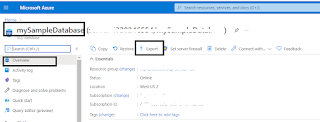
1) First we need to create a storage account ,container to place the .BACPAC file in Azure. 2)  In this container we will place the .BACPAC file of Azure SQL database. 3) Create the backup file of Azure SQL Database, below image will tell you. *for bigger images click on the images below, it will pop in new window 4) Sometimes we can also use some other Third party tool   with which we can     take the Azure SQL Database backup and can save it to your local drive. However I have explained here, how to take the Azure SQL Database backup in Azure Portal. 4) Move back to SQL Server from Azure SQL Database and see the progress as mentioned below. 5) After downloading the .BACPAC file from your azure storage to your local drive. You can restore this .BACPAC file into your local SQL Server. Below images are self explanatory.

How to create Azure SQL Admin and can access with "Active Directory-Universal with MFA Support" authentication from SSMS

Image
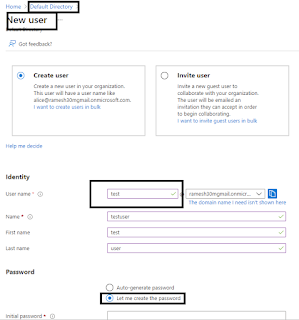
 To access Azure SQL Database from SSMS through "Active Directory-Universal with MFA Support" authentication please follow the below steps. 1) Create an user Azure Active Directory level with MFA authentication. a) Search Azure Active Directory in market place b) Click add user so you can see the below image. c) Provide initial password and create the user. d) Now in the below image test user has been created 2) Add this test user to Directory Readers and Directory Writers role and also Global Administraor though the below image does not show it you can add it without missing. Please see the image. Chose those two roles and click on Add button and refresh. And choose authentication method too . b) Now you could see test user allocated those two roles. and very important to access Azure Active directory users. c) Now go to authentication provide users or your phone number(if you working at home for practice) after providing the phone number with +91 XXXXXXXXXX click on save b...

Automate BACKUP DATABASE script.

The below script will generate backups for all the databases in a single instance. SET NOCOUNT ON DECLARE @ servername varchar ( 50 ) DECLARE @ databasename varchar ( 50 ) DECLARE @ path VARCHAR ( 50 ) DECLARE @ stmt varchar ( 4000 ) DECLARE @ I INT DECLARE @ Count INT DECLARE @ Databases table (Sno INT IDENTITY ( 1 , 1 ),[Name] varchar ( 50 )) INSERT INTO @ Databases ([Name]) SELECT Name FROM sys.databases WHERE State = 0 and database_id not in ( 2 ) SET @ I = 0 SELECT @ Count = COUNT ( * ) FROM @ Databases SET @ servername = HOST_NAME() --Provide path name here dont give \ in the end. SET @ path = '\\ramesh\LS' WHILE( @ I <@ Count ) BEGIN SET @ I =@ I + 1 SELECT @ databasename = [Name] FROM @ Databases WHERE Sno =@ I SET @ stmt = 'BACKUP DATABASE ' + '[' +@ databasename + ']' + ' TO DISK= ' + '''' +@ path + '\' +@ servername + '_' +@ databasename + '_' + REPLACE (...

SSRS REPORTS SUBSCRIPTION SCHEDULES AND NAMES OF THE REPORTS

 The below query will gives you the SSRS subscription scheduled information from SQL Server end. DECLARE @ jobName VARCHAR ( 100 ) SET @ jobName = '52B9C43E-748E-40B9-8FC9-A95369E2ED73' SELECT jobs.date_created,JOBS.[NAME],jobschedule.next_run_date, NextRunTime = stuff(stuff( right ( '00000' + cast (jobschedule.next_run_time as varchar ), 6 ), 3 , 0 , ':' ), 6 , 0 , ':' ) ,schedules.[enabled] AS ScheduleEnable from msdb.dbo.sysjobs jobs INNER JOIN msdb.dbo.sysjobschedules jobschedule ON jobs.JOB_ID = jobschedule.JOB_ID inner join msdb.dbo.sysschedules schedules ON schedules.schedule_id = jobschedule.schedule_id WHERE jobs.[name] =@ jobName The below query will tell you about which sql server agent job is running which report and its schedules SELECT distinct sj.[name] AS [Job Name], rs.SubscriptionID, c .[Name] AS [Report Name], c .[Path] FROM msdb..sysjobs AS sj INNER JOIN ReportServer..ReportSchedule AS rs ON sj.[name] = CA...

Backup to URL in Azure

 The scenario is describing about how to take the backup from the SQL Server in Azure Virtual machine and store the backup file of particular database in Azure Container.  SELECT * FROM sys.credentials DROP CREDENTIAL [https: // 123 storages. blob .core.windows.net / 123 container] GO USE master GO CREATE CREDENTIAL [https: // 123 storages. blob .core.windows.net / 123 container] --this link you find in the continaer properties WITH IDENTITY = 'Shared Access Signature' --This shouble alwas shared access signature.Dont change the value /*the below value came from Shared access signature of continer.*/ /*Use Container Shared access signature instead of Storage access signature.*/ ,SECRET = 'sv=2020-02-10&ss=bfqt&srt=sco&sp=rwdlacuptfx&se=2021-06-19T18:52:52Z&st=2021-06-19T10:52:52Z&spr=https&sig=Tgt6H8qXTKVroVkEqmHUk2ruP8HFnk%2FsN%2BeHMP18tVQ%3D' ; -- Access key GO BACKUP DATABASE TEST2 TO URL = N 'https://123storages....

The transaction log for database is full due to 'OLDEST_PAGE'

When I see the 'OLDEST_PAGE' in log_reuse_wait_desc column and not allowing to me to shrink the log file of database I followed the below steps 1) When you see 'OLDEST_PAGE' run CHECKPOINT on that particular database 2) Take the Transaction log backup of that particular database 3) Try to shrink the log file of database These steps worked for me when I encountered this issue in my environment.

Copy-DbaLogin,Always On Login Sync Issues

The mentioned command will replicate the SID's of SQL Server login accounts in Always On Availability replicas and automate the process. We have no need to update the logins when the failover occurs. The below command will drop and recreate a the login in secondary replica and the process would be very fast. And particularly it resolve SID mismatch issues between replicas. cls Copy-DbaLogin -Source SourceServerHere -Destination DestinationServerHere -Login Login1,Login2 -force -Verbose The below SQL query will works in normal environment where we are moving logins from one server to another server or source to destination. Need to run this query in master database of source server. And It creates stored procedure called sp_help_revlogin. After creating this procedure in Source server run this and you can see the results. Copy the same results and paste in Destination server and all the logins will get create. https://learn.microsoft.com/en-us/troubleshoot/sql/security/transfer...

BACKUP LOG Terminating abnormally, MSG 3013, LEVEL 16, STATE 1, LINE 4

Image
I got the below error when we trying to take the transaction log backup of model databases. So as a part of solution, we change the recovery model of the model database from FULL to SIMPLE and then immediately changed it from SIMPLE to FULL. This resolved the issue. There is also a possibility that the below commands might not work in all cases. In that situation RESTART SQL server instance. This worked in my environments. USE [master] GO ALTER DATABASE [model] SET RECOVERY SIMPLE WITH NO_WAIT GO USE [master] GO ALTER DATABASE [model] SET RECOVERY FULL WITH NO_WAIT GO

Add-DBADbRolemember,dbatools

The below command will create a new user at database level and add that user to the required roles. cls $UserName = 'UserNameHere' $InstanceName = 'InstanceNameHere' New-DbaDbUser -SqlInstance $InstanceName -Database DatbaseNameHere -Username $UserName Add-DbaDbRoleMember -SqlInstance $InstanceName ` -Database DatabaseNameHere ` -Role "db_ddladmin" , "db_executor" , "db_datawriter" , "db_datareader" , "db_spexec" ` -User $UserName -Verbose

Get-DbaAgentJobHistory,dbatools

The below powershell command will give the information about SQL Server agent job and its status. cls Get-DbaAgentJobHistory ` -SqlInstance ServerNameHere ` -Job 'Job Name Here' ` -WithOutputFile| Where-Object {( $_ .Rundate -like "*05/06/2021*" )} -Verbose| Sort-Object Rundate -Descending| Format-Table ComputerName,SQLInstance,Job,RunDate,Status,Stepid,Message -Wrap

New-DbaLogin,dbatools

The below command will create an SQL Server authentication login on both the servers at a time. Once you run the command a pop window ask for password, then provide the password.  cls New-DbaLogin ` -SqlInstance SERVER1,SERVER2 ` -Login LoginNameHere -Verbose #Handling Windows login. The main thing we #need to remember here is DOMAIN name. cls New-DbaLogin ` -SqlInstance Server1 ` -Login DomainName\Login1,DomainName\Login2 -Verbose

Getting SQL Server services info from multiple servers through Powershell

Image
Here the STATE 4 means "RUNNING" 1 Stopped. And the server names should be Windows Server names in which SQL Server instances are installed. cls #SQL Server 2014 $cmt1 = "ComputerManagement12" #sqlserver2016 $cmt2 = "ComputerManagement13" #sqlserver2017 $cmt3 = "ComputerManagement14" #SQL Server 2012 $cmt4 = "ComputerManagement11" #SQL Server 2008/2008 R2 $cmt5 = "ComputerManagement10" #provide only windows server names here $server = @ ( 'SERVER1' , 'SERVER2' , 'SERVER3' ) $server | ForEach -Object{ $singcmpt = $_ cd C : \windows\System32 $CmptMgmt =gwmi -ns 'root\Microsoft\SqlServer' __NAMESPACE -ComputerName $singcmpt | ? { $_ .name -match $cmt1 } |Select Name $CmptMgmt | ForEach -Object{ $singCmptMgmt = $_ if ( $singCmptMgmt = $cmt1 ) { Write-Host "$singcmpt is SQL Server 2014" -Verbose Get-CimInstance -ComputerName $singcmpt -Namespace "root/Microsoft/SqlS...