Posts

How to setup a public ip to a Azure virtual machine
Image
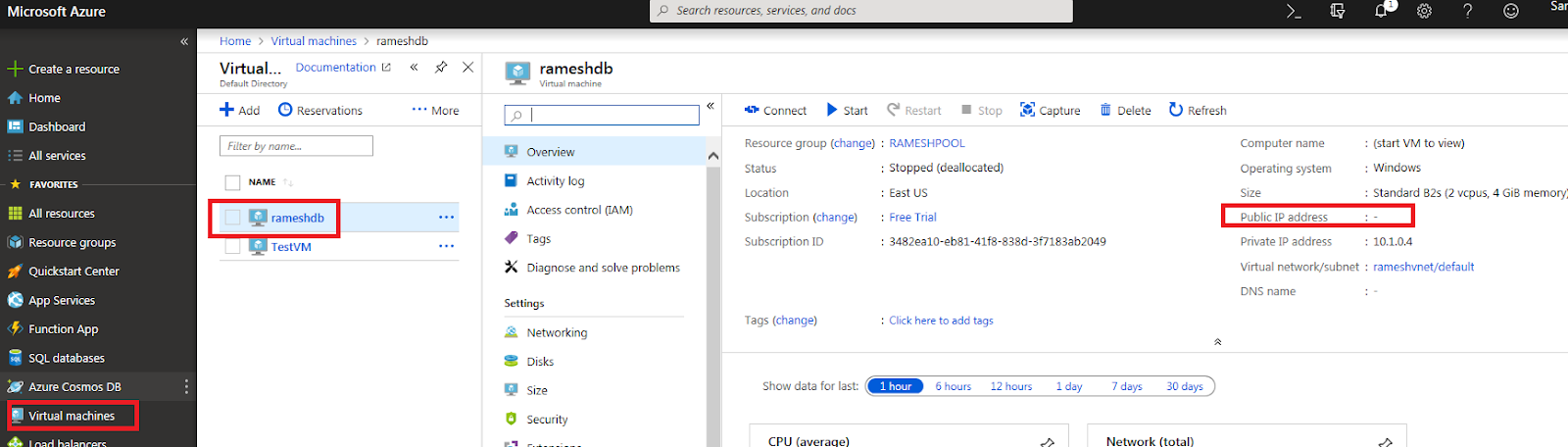
The below images will guide you how to create a public ip to an existing azure virtual machine. Wherever I highlighted in red click on those, If you click on "Virtual Machines" then it will show you the virtual machines that are available. Here I am changing the IP of "rameshdb" VM. If you click on "rameshdbVM", it will open another blade, and in "Over View" section "Public ip" showing as blank. And you can see the image below. Next you can go to the tabs that are under below image. Click on "Networking" tab, and it will route open another blade, and click on "Network Interface". And in the same image you can see "public ip" showing blank After clicking on "Network interface" it takes you to below image. Click on "IpConfiguration" and once you click on it another blade will open. So you also click on below link where "Public IPAddress" showing as blank...
Which user has what permissions on table level in all the databases.

DECLARE @Command NVARCHAR(4000) SELECT @Command='select db_name(db_id(''?'')) ,sys.schemas.name ''Schema'' ,sys.objects.name Object ,sys.database_principals.name username ,sys.database_permissions.type permissions_type ,sys.database_permissions.permission_name ,sys.database_permissions.state permission_state ,sys.database_permissions.state_desc ,state_desc + '' '' + permission_name + '' on [''+ sys.schemas.name + ''].['' + sys.objects.name + ''] to ['' + sys.database_principals.name + '']'' COLLATE LATIN1_General_CI_AS from sys.database_permissions join sys.objects on sys.database_permissions.major_id =sys.objects.object_id join sys.schemas on sys.objects.schema_id = sys.schemas.schema_id join sys.database_principals on sys.database_permissions.grantee_principal_id =sys.database_principals.principal_id order by 1, 2, 3, 5' EXEC sp_MSf...

Replication is failing after doing fail over to Secondary replica in Always On

Image
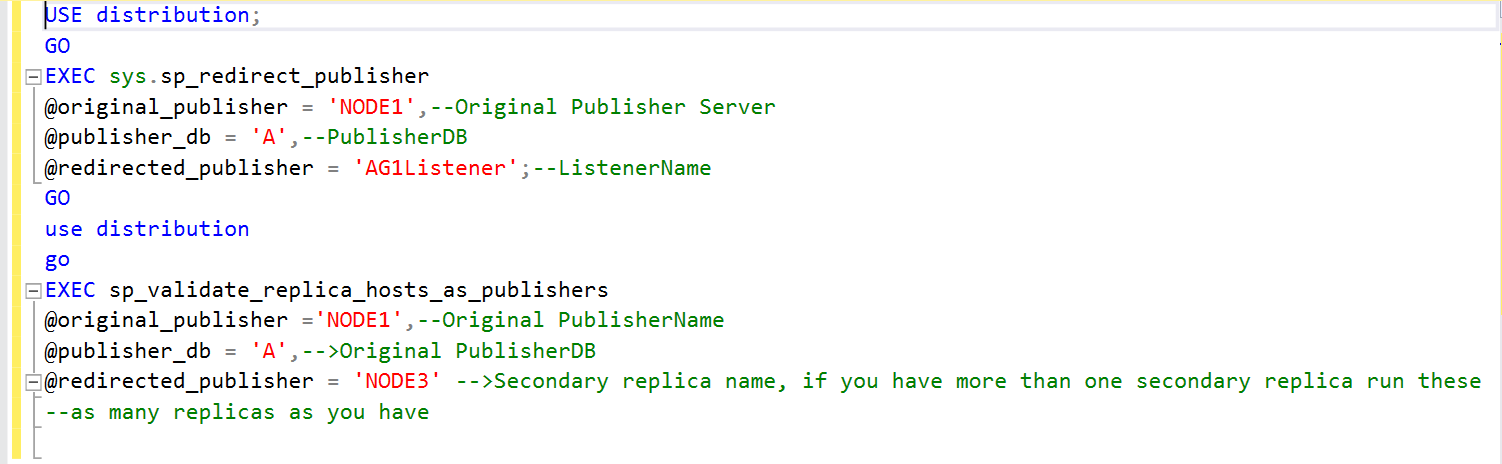
To day i configured Replication on Always on High availability where i have One primary and two secondaries, I configured successfully first time, but i started facing issue after fail over. To overcome those issue we need to run the below commands.  Before you are running the below commands you have to remotely login into distributor server and run the commands. Dont access distributor server from publiser server and run these. You have REMOTELY LOGIN into the DISTRIBUTOR server. After fail over what happens is primary server become secondary and secondary server becomes primary, In these cases replication fail with an error message, if it is a Transaction publication and the error message would be "The process could not execute sp_replcmds on NODE1".  At this stage NODE1 became a SECONDARY replica and it is throwing error. At this stage we have to run the below commands, the below command will redirect every query to the Availability Group listener regardless of...

Rebuild system databases in SQL Server

Image
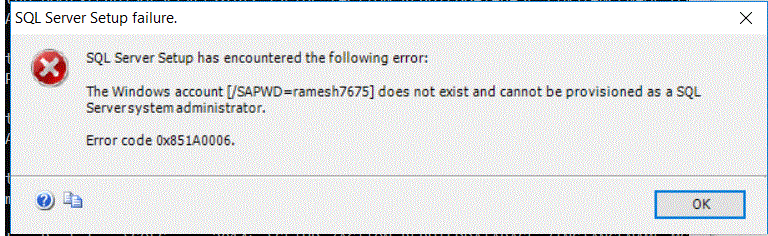
To day after moving system database files from one drive to another drive, I faced this problem. I am unable to restart the SQL Server instance, so I though I will rebuild all the system databases. So I ran below command in command prompt , I rectified the below error mentioned as well. 1) While executing the command in command prompt don't, change the pattern. Use the below pattern. Use the same parameter pattern /ACTION=REBUILDDATABASES /SQLSYSADMINACCOUNTS="RB.RAMESH"--> This could be your computer name or the logon account with which sql server services are running. /INSTANCENAME=MSSQLSERVER-->Provide SQL Server service name here, the name  that you are seeing under configuration manager. /SAPWD--> Don't get confuse with this SA password, this is not SA login password this is representing SA(system administrator) password,however you can also provide this when you are running sql server with mixed mode authentication. But while passing t...

Unable to connect to SQL Server instance by providing FQDN name

Today i got one of the errors in my environment, i am trying to access one of the sql server instances from another server. For example  i have two servers one is NODE1 and another is NODE2. I am  trying connecting to NODE2 from NODE1. If i give a server name as NODE2 it is not working but if i give ip address of the respective instance it is working. My challenge here is how to connect to SQL Server instance by providing the name.  I am getting error as name is not available, but if we see the server name  is existing. At this stage i follwed below process. I wen to below path in NODE1  the path is C:\Windows\System32\drivers\etc  and in etc folder i found "hosts" file. Right click on this file open with note pad. And add NODE2 ip along with FQDN name and save it. And then check now it will take server name, you can access SQL Server instance after you are adding the ip and FQDN name of that particular server. 192.168.10.11  NODE2.RAP...

FN_HADR_GROUP_IS_PRIMARY function

USE master go SET ANSI_NULLS ON GO SET QUOTED_IDENTIFIER ON GO CREATE FUNCTION dbo.[fn_hadr_group_is_primary] (@AGName SYSNAME) RETURNS BIT AS BEGIN                                 DECLARE @PrimaryReplica SYSNAME;                                 SELECT @PrimaryReplica=HAGS.Primary_replica                                 FROM sys.dm_hadr_availability_group_states HAGS                                 INNER JOIN sys.availability_groups AG                                 ON AG.group_id=HAGS.group_id                       ...

Creating root certificate and client certificate to establish a VPN connection to cloud from On premises.

Creating root certificate and client certificate to establish a VPN connection to cloud from On premises. We can run the below commands from power shell $cert = New-SelfSignedCertificate -Type Custom -KeySpec Signature ` -Subject "CN=ROOTCERTIFICATE" -KeyExportPolicy Exportable ` -HashAlgorithm sha256 -KeyLength 2048 ` -CertStoreLocation "Cert:\CurrentUser\My" -KeyUsageProperty Sign -KeyUsage CertSign <#   We are generation a Client certificate from root certificate. After you are creating this go to certmgr.msc(run this command from command propmpt) #> New-SelfSignedCertificate -Type Custom -DnsName REBELCLIENT -KeySpec Signature ` -Subject "CN=CLIENTCERTIFICATE" -KeyExportPolicy Exportable ` -HashAlgorithm sha256 -KeyLength 2048 ` -CertStoreLocation "Cert:\CurrentUser\My" ` -Signer $cert -TextExtension @( "2.5.29.37={text}1.3.6.1.5.5.7.3.2" ) Get-ChildI...

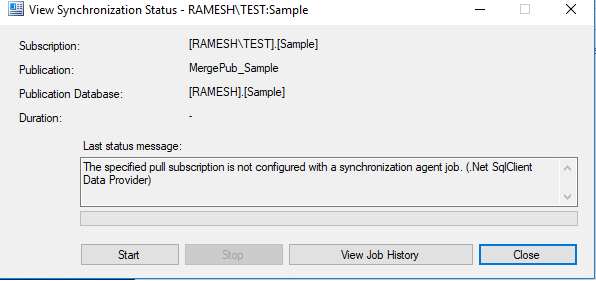
The specified pull subscription is not configured with a synchronization agnent job.(.Net sqlclient Data Provider)

Image
I got this below error while i am working in Merge Publication in sql server. I have configured merge publication as pull publication in the environment,so obviously the merge agent job created under subscriber server, but suddenly it stopping rolling forward changes to the subscriber and throwing the below mentioned error.     If i try to click on the Start button the above error is coming up. The issue came up because some added a new step in the job properties of steps section and deleted that later, afterwards this issue occuring. Workaround: Delete the exising Merge agent job from subscriber server before you are running the below query. --run this in subscriber server under pull subscription exec sp_addmergepullsubscription_agent   @publisher = 'RAMESH' ,--> Publisher server name here   @publisher_db = 'sample' ,-->Publisher database name here   @publication = 'MergePub_Sample' ,-->Publication name her...

Msg 2732, Sev 16, State 1, Line 472 : Error number 3013 is invalid. The number must be from 13000 through 2147483647 and it cannot be 50000. [SQLSTATE 42000] Job 'JobNameHere' : Step 2, 'StepNamehere' : Began Executing 2019-04-25 02:06:07

To day i got an error in one of my clients environment. One of the SQL Server Agent jobs got failed with the below error message. Msg 2732, Sev 16, State 1, Line 472 : Error number 3013 is invalid. The number must be from 13000 through 2147483647 and it cannot be 50000. [SQLSTATE 42000]  Job 'JobNameHere' : Step 2, 'StepNamehere' : Began Executing 2019-04-25 02:06:07 When i first go through the error, i thought it could be code issue which is written in a particular stored procedure of job. What this job is doing it is restoring the backups from source. So wherever it is restoring in that server in whichever drive the log file is placing(.LDF) , the free space in that particular drive is very less, increasing the log file drive(wherever LDF file is placing) space resolved the issue.

Getting the Cluster info through power shell from the cluster nodes.

<#You can pass multiple computer names or server names to the computer parameter name. But  dont provide values in between ""#> Invoke-Command  ` -ComputerName   SERVER1 , SERVER2 , SERVER3  ` -ScriptBlock { Get-ClusterGroup | Format-Table   -AutoSize Get-ClusterResource | Where-Object  {( $_ . ResourceType   -like   "*SQL SERVER*" )   -or  ( $_ . ResourceType   -like   "*Generic*" )} | Format-Table   -AutoSize } | Format-Table   -AutoSize

Getting the folder and sub folder information in a particular drive or path through power shell

The below Powershell query will extract the folder and sub folder info in the given path. I just mention here folder  names -path showing as "MainFolder" and "SubFolder". In this place you provide your needed folders. -Exclude:   This is a parameter to which we need to pass extension of files, which we are expecting not to show in the result set. Clear Get-ChildItem ` -Path \\MainFolder\Sub\Sub1 ` -Exclude *.dtsx,*.sql*,*.onepkg*,*.docx*,*.doc*,*.log* -Recurse| Where-Object {$_.Name -like "*Full_*"} #Will provide DIFF info #clear Get-ChildItem ` -Path \\MainFolder\Sub\Sub1 ` -Exclude *.dtsx,*.sql*,*.onepkg*,*.docx*,*.doc*,*.log* -Recurse| Where-Object {$_.Name -like "*Diff_*"} # The below query will handle above both the queries. clear Get-ChildItem ` -Path E:\SQLBackups\Backups  ` -Exclude *.dtsx , *.sql* , *.onepkg* , *.docx* , *.doc* , *.log* -Recurse | Where-Object {( $_ . Name -like ...

Understanding Backup Preferences for Always on Availability Group Databases

SQL Server backups are resource intensive operation that strain on I/O and CPU(with backup compression). Always On Availability Group(AOAG) has a mechanism to offload SQL Server Backups and read operations from primary replica to reduce such workloads and utilize secondary replica in a better way. 1. Regular FULL BACKUPS are not allowed from secondary replicas.   But  COPY_ONLY  full backups are allowed on secondary replicas. That means you cannot run regular Full backup  from any of the secondary replica.  Remember that copy-only backups do not impact the log chain or clear the differential bitmap. 2. DIFF BACKUPS(Differential backups) are not supported on secondary replicas . If you need Differential backups for your availability databases don't chose backup preference as SECONDARY ONLY 3. Only regular log backups are supported on secondary replicas. COPY_ONLY log backups are not supported on secondary replicas. 4. Secondary replica must be in S...

Msg 21892, Level 16, State 1, Procedure sp_hadr_validate_replica_hosts_as_publishers, Line 70 Unable to query sys.availability_replicas at the availability group primary associated with virtual network name 'AG2Listener' for the server names of the member replicas: error = 18456, error message = Error 18456, Level 14, State 1, Message: Login failed for user 'NT AUTHORITY\ANONYMOUS LOGON'..',

Image
Recently i have configured Transactional replication on Always on availability group databases. And i came across below errors . My configuration is like below NODE1-->Orginal Pubisher and Primary replica NODE2-->Secondary replica NODE3-->Distributor server and not part of any replica NODE4--> Subscriber server. I got this error when i am running the below query after remotely login in into NODE1 server which is primary replica server and from there i connected to NODE3 server which is a distributor and i have ran the query and got the below error. So this time i have logged into the NODE3 which is a distributor server remotely and ran the below query and again i got the below error. So again i ran the sp_adddistpublisher command from the distributor server which is NODE3 and i got the below error After that i have observed one thing on the environment, if you connect to the NODE2(Original Secondary replica) right click on replication tab, you w...

sp_validate_replica_hosts_as_publishers (Transact-SQL)

sp_validate_replica_hosts_as_publishers (Transact-SQL) The below procedure need to run in THE DISTRIBUTOR server alone, login into DISTRIBUTOR server remotely(mstsc) and run this command. Otherwise this will lead to unnecessary confusion while making the secondary replica is eligible for publisher.

REBUILD MASTER DATABASE WITH COMMAND PROMPT

Image
If the services did not come online before you go for REBUILD database try to bring the server online by using the command below using TRACE FLAG. If this did not work  follow the rebuild process. First check with below command. If the above command does not work please add  "-f" parameter which is case sensitive  and try once. If you are rebuilding NAMED INSATNCE of sql server please use provide the server name like below whether you start in single user mode or whether you start normally. If you are  using domain account first image is the use ful image. Sometimes this REBUILD database(above script or immediate image below) will not bring back existing databases back which are there in previously, so we need to address this in a different way. So go through the below links for reference. Whether it is windows authentication or mixed mode authentication providing value to 'sa' account is compulsory. moving system databases MSSQLSERVER_17204 After RE...

SQL Server Agent Jobs Status from Multiple instances through powershell query

The below powershell script brings information about SQL Server Agent jobs and its status from more than one SQL Server instance. CLEAR $HOSTNAME = 'COMPUTERNAMEHERE' Import-Module sqlps -DisableNameChecking $servernames = @( "computername\namedinstancename1" , "computername\namedinstancename2" , "computername\namedinstancename3" , "computername\namedinstancename4" , "computername\namedinstancename5" ) $servernames | ForEach-Object {     $computername = $_     #Get a server object which corresponds to the default instance     $srv = New-Object `     -TypeName 'Microsoft.SQLServer.Management.Smo.Server' `     -ArgumentList $computername     $srv . JobServer . Jobs |     Select-Object OriginatingServer , Name , LastRundate , LastRunOutcome , NextRunDate , CurrentRunstatus |     Where-Object LastRunOutcome -EQ "Failed"...

SQL Management Objects(SMO) of SQL Server in Powershell and also finding out Server Management Objects

Import-Module SQLPS -DisableNameChecking $MyComputer = $env:COMPUTERNAME #Provide sql server instance name here $instanceName = $MyComputer + '\TEST' $instanceName #This information will give you all SMO'S of SQL Server $server = New-Object ` -TypeName Microsoft.SQLServer.Management.Smo.Server ` -ArgumentList $instanceName $server | Get-Member -MemberType "Property" | Where-Object Definition -like "*SMO*"  The below Powershell query will provide us the information about SQL Server Assemblies  clear [ appdomain ]:: CurrentDomain . GetAssemblies() | Where { $_ . FullName -match "SQLServer" } | Select FullName