Posts

Understanding Logging and Recovery in SQL Server

The below information provided by Paul S Randal for understanding the Logging and Recovery   Understanding Logging and Recovery

How to run Diagnostic tool provided by Microsoft.

Image
  1)        From a workstation that has internet, download TSS tool from this link, this is a set of scripts that will gather the System and SQL logs that I need  http://aka.ms/getTSS 2)        Move the file to the server having the issue, in this case, you will need to copy the file into all the nodes involved. 3)        Open CMD.EXE as Administrator inside tss_tools folder. 4)        Run TSS SDP:SQLBase 5)        The collection will start: 6)   Adding another image which equal to above as the above image is not clear. 7)        When it finishes, you will see a folder called MS_DATA in C drive. Inside that folder you should see a .zip file, upload that file to the following link Kindly run the command below to collect the Cluster Logs:          ...

User object level permissions at database in Azure SQL Database.

Select the database name from dropdown as USE command does not work in Azure SQL Databse. SELECT DISTINCT pr.principal_id, pr.name AS [UserName], pr.type_desc AS [User_or_Role], pr.authentication_type_desc AS [Auth_Type], pe.state_desc, pe.permission_name, pe.class_desc, o.[name] AS 'Object' FROM sys.database_principals AS pr JOIN sys.database_permissions AS pe ON pe.grantee_principal_id = pr.principal_id LEFT JOIN sys.objects AS o on (o.object_id = pe.major_id) Which user belong to which database role go SELECT ServerName =@@ servername,dbname = db_name(),DP1.name AS DatabaseRoleName, isnull (DP2.name, 'No members' ) AS DatabaseUserName FROM sys.database_role_members AS DRM RIGHT OUTER JOIN sys.database_principals AS DP1 ON DRM.role_principal_id = DP1.principal_id LEFT OUTER JOIN sys.database_principals AS DP2 ON DRM.member_principal_id = DP2.principal_id WHERE DP1. type = 'R' ORDER...

SQL Server services are not starting or not coming online

Image
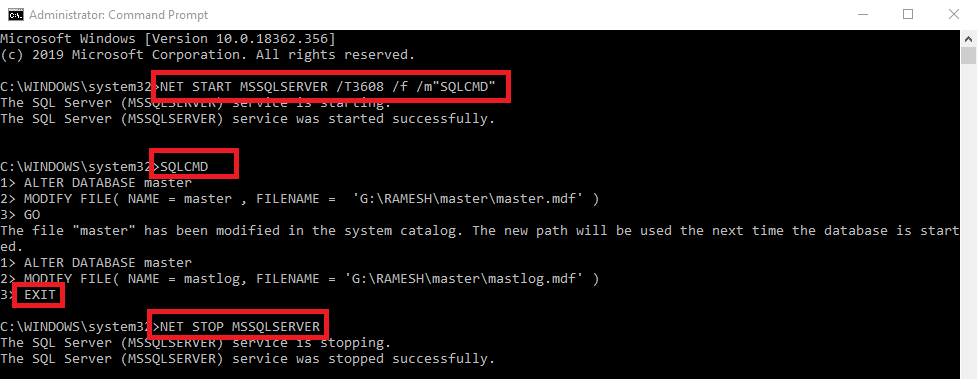
 SQL Server services are not coming online and throwing below error in the eventvwr. So we need to bring it online with single-user mode. Error: => SQL services were not coming up as it was failing with the below errors for all the System databases: FCB::Open failed:  Could not open file d:\dbs\sh\sprel\0822_164025\ cmd\33\obj\x64retail\sql\ mkmastr\databases\mkmastr. proj\MSDBData.mdf for file number 1.  OS error: 3(The system cannot find the path specified.). 2020-12-22 19:37:05.47 spid15s     Starting up database 'mssqlsystemresource'. 2020-12-22 19:37:05.47 spid7s      Error: 5120, Severity: 16, State: 101. 2020-12-22 19:37:05.47 spid7s      Unable to open the physical file "d:\dbs\sh\sprel\0822_164025\ cmd\33\obj\x64retail\sql\ mkmastr\databases\mkmastr. proj\MSDBData.mdf". Operating system error 3: "3(The system cannot find the path specified.)". 2020-12-22 19:37:05.47 spid7s      Error: 17207, Severity: 16, ...

How to check whether your installed SQL Server instance is CORE or CAL

One day we got a mail from client asking us to upgrade existing SQL Server instance to new version and edition. At the same he also asked me the existing SQL Server instance license type is it a CORE or CAL. I have gone through the a couple of SQL Server commands like  SELECT @@version and SELECT SERVERPROPERTY('LicenceType') but the results shown as NULL. Later i checked with one of my old friends and he suggested me to check that in the below path. And i found it in the below path. You can see multiple .txt files here but take old folder and you could see a file name like  SQL_ENGINE_CORE_INST_CPU64_1. If you open this file you could see a product name as second line  below C:\Program Files\Microsoft SQL Server\110\Setup Bootstrap\Log\20140708_110252 Product: \\Racnu337bn08\ddrive$\x64\setup\ sql_engine_core_inst_msi \ sql_engine_core_inst.msi

database files movement from one drive to another drive in sql server

1 ) Capture the .mdf and ldf file names of that particular datbase to which you want to move SELECT * FROM sys.master_files 2 ) Ensure that you have latest .BAK file available for rollback plan 3 ) Take that particular database alone into OFFLINE ALTER DATABASE database_name SET OFFLINE 4 ) Move the files to new location 5 ) Run the below command make changes at system catlogue level USE master GO ALTER DATABASE AdventureWorks2012 MODIFY FILE( NAME = AdventureWorks2012_Log, FILENAME = 'C:\NewLoc\AdventureWorks2012_Log.ldf' ); GO ALTER DATABASE AdventureWorks2012 MODIFY FILE ( NAME = AdventureWorks2012_Data, FILENAME = 'C:\NewLoc\AdventureWorks2012_data.mdf' ); 6 ) Bring the database ONLINE ALTER DATABASE database_name SET ONLINE 7 )Once the database came online run the below commmand to chek whether the new path appearing at catlogue level SELECT name, physical_name AS...

Sleep command for Windows

 I came across a situation where my Home system which is Windows 10 Pro not able to go to sleep mode and my CPU is always up and running, I have gone through a couple of blogs, documents and also google a couple of articles some says due to Network Adapters, In my system, all the network adapters( ncpa.cpl ) are in the disabled state though my system is always awake not going to sleep mode. After a couple of hours research i found this command which fulfilled my requirement. powercfg/requestsoverride driver srvnet system" 

Index information on a particular database.

I have gotten into a situation where one of the index page got corrupted in one of the databases. Regarding corruption we come to know when run DBCC CHECKDB command and it thrown an error message like below. Msg 8936, Level 16, State 1, Line 3 Table error: Object ID 1701581100, index ID 1, partition ID 72057594048479232, alloc unit ID 72057594058964992 (type In-row data). B-tree chain linkage mismatch. (1:1209224)->next = (1:1081), but (1:1081)->Prev = (1:1080). Search here with the below query by adding ObjectID(above) to the query USE DatabaseNameHere GO SELECT * FROM sys.indexes where object_id = '123456' This query will also bring information about Primary Key indexes. USE DatabaseNameHere GO select s.name, t.name, i.name, c .name from sys.tables t inner join sys.schemas s on t.schema_id = s.schema_id inner join sys.indexes i on i.object_id = t.object_id inner join sys.index_columns ic on ic.object_id = t.object_id inner join sys.co...

Granting Permissions to Create Function

 By using the below code we can GRANT permission to create a function to a particular user use [AdventureWorks2012] GO GRANT CREATE FUNCTION TO [bhavya] GRANT ALTER ON SCHEMA ::dbo TO [bhavya]

Coloring a particular a Row result with PowerShell

cls $services = Get-Service -name '*sql*' $services | ForEach -Object{ $Know = $_ if ( $_ .Status -eq "Running" ) { Write-Host $Know .Status, $Know .Name, $Know .DisplayName -foregroundcolor Green -Separator ' : ' } else { Write-Host $Know .Status, $Know .Name, $Know .DisplayName -foregroundcolor Red -Separator ' : ' } }

Adding members to Active Directory Login Groups in SQL Server through powershell

Image
 By using the below command lets we can add members to the active directory login groups. While Providign Group name dont provide the Domain name group alone works. <# The below Windows feature command will import Poweshell Module Add-WindowsFeature #> Add-WindowsFeature RSAT-AD-PowerShell Import-Module ServerManager import-module activedirectory <# Space is compulsory between FirstName and LastName else it throws error Depends on requirement you can choose like(-like) or equal(-eq) commands. #> Get-ADUser -Filter 'Name -like "*Ramesh, Mamillapalli"' Add-ADGroupMember -Identity "GroupNameHere" -Members ( Get-ADUser -Filter 'Name -like "*Ramesh, Mamillapalli"' ) Get-ADUser -Filter 'Name -like "*MamilRam*"' The below query fetch group members from active dirctory domain group cls $GroupName = 'GroupNameHere' Get-ADGroup -filter *|sort name| Where-object { $_ .Name -eq $GroupName...

Migrating database level permissions(users and their permissions) from Source to Destination in sql server

The below script need to run based on the requirement for instance if you are restoring a production database in UAT environment for testing purpose follow these instructions 1) Run the below script in UAT environment and capture the user info and save it to notepad 2) Then RESTORE production database in UAT environment 3) Then run the script that we captured in the first script. NOTE: Even after running the below script there is a possibility that you can find orphaned users , so try to run  EXEC sp_change_users_login 'Report'; and fix the orphans users if any exists. There is another powershell command which is available in dbatools, to use the below command first you need to import or install dbatools . DECLARE @ sql VARCHAR ( 2048 ) , @ sort INT DECLARE tmp CURSOR FOR /*********************************************/ /********* DB CONTEXT STATEMENT *********/ /*********************************************/ SELECT '-- [-- DB CONTEXT --] --...

Which login belongs to which active directory group, handling through xp_logininfo.

  Run the first piece of code with in the comment section first. This will generate print statement of  xp_logininfo. Copy that print statement and paste it in the second pieced of code in between ' ' otherwise it throws error. /* DECLARE @Stmt NVARCHAR(4000) set @Stmt='SELECT ''EXEC master..xp_logininfo ''+''''''''''''+Name+''''''''''''+'',''+''''''''''members'''''''''' FROM sys.server_principals where [type]=''G''' EXEC sp_executesql @Stmt */ declare @ STMT2 VARCHAR ( 4000 ) set @ stmt2 = ' EXEC master..xp_logininfo ''domain1\group1'',''members'' EXEC master..xp_logininfo ''domain1\grop2'',''members'' EXEC master..xp_logininfo ''domain1\group3'',...

Exclusive access could not be obtained because the database is in use_OFFLINE_ONLINE

Usually I used to get this type error while i am trying to RESTORE databases. So to avoid these type of errors permanently we need to write RESTORE command in between changing SINGLE_USER and MULTI USER statements. See below command. Msg 3101, Level 16, State 1, Line 2 Exclusive access could not be obtained because the database is in use. Msg 3013, Level 16, State 1, Line 2 RESTORE DATABASE is terminating abnormally. Msg 3117, Level 16, State 1, Line 3 The log or differential backup cannot be restored because no files are ready to roll forward. Msg 3013, Level 16, State 1, Line 3 RESTORE DATABASE is terminating abnormally. Don't use GO command between the below statement run it as a single script. USE [master] ALTER DATABASE [Adventureworks] SET SINGLE_USER WITH ROLLBACK IMMEDIATE ---RestoreCommand between these two statements. RESTORE DATABASE Adventureworks FROM DISK = 'D:\Adventureworks_full.bak' WITH NORECOVERY ALTER DATABASE Adventureworks SET ...

process terminated unexpectedly error 1067

I got this error in one of my clients environment where they are migrating their environment from VMWare to Hyper-V. They have migrated Hyper-V but the SQL Server Analysis services are not up and running, When we try to START the services it is throwing below error and the Services are not coming online, due to which even Windows Failover Cluster Roles and Services are OFFLINE state, and restarting the server is also not worked, moving nodes also not worked The main culprit here is DRIVES, drives are not migrated and in my environment DRIVE LETTER GOT CHANGED in which SQL Server Analysis configured.  You can check the drive information of Analysis Services in the start up parameters of SQL Server Analysis services, either this could be from SQL Server Configuration Manager or from Servicse.msc. After that made change to the respective drive from diskmgmt.msc and it is fixed the issue. "process terminated unexpectedly error 1067"

Which user has which database level or object level access in SQL Server.

DECLARE @name sysname, @ sql nvarchar( 4000 ), @maxlen1 smallint , @maxlen2 smallint , @maxlen3 smallint DECLARE @ Table TABLE (DBName VARCHAR ( 1000 ),UserName VARCHAR ( 1000 ),RoleName VARCHAR ( 1000 )) IF EXISTS ( SELECT TABLE_NAME FROM tempdb.INFORMATION_SCHEMA.TABLES WHERE TABLE_NAME LIKE '#tmpTable%' ) DROP TABLE #tmpTable CREATE TABLE #tmpTable ( DBName sysname NOT NULL , UserName sysname NOT NULL , RoleName sysname NOT NULL ) DECLARE c1 CURSOR for SELECT name FROM master.sys.databases OPEN c1 FETCH c1 INTO @name WHILE @@FETCH_STATUS >= 0 BEGIN SELECT @ sql = 'INSERT INTO #tmpTable SELECT N''' + @name + ''', a.name, c.name FROM [' + @name + '].sys.database_principals a JOIN [' + @name + '].sys.database_role_members b ON b.member_principal_id = a.principal_id JOIN [' + @name + '].sys.database_principals c ON c.principal_id = b.role_principal_id WHERE a.name != ''dbo...