Posts

SQL Server Database BACKUP failure events.

  cls $logs = @ ( 'System' , 'Application' , 'Security' ) foreach ( $log in $logs ){ Get-EventLog ` -LogName $log | Where-Object {( $_ .EventID -in(3041,18210,9002)) -and ( $_ .TimeWritten -like '*02/12/2023*' )}| Format-Table -Wrap }

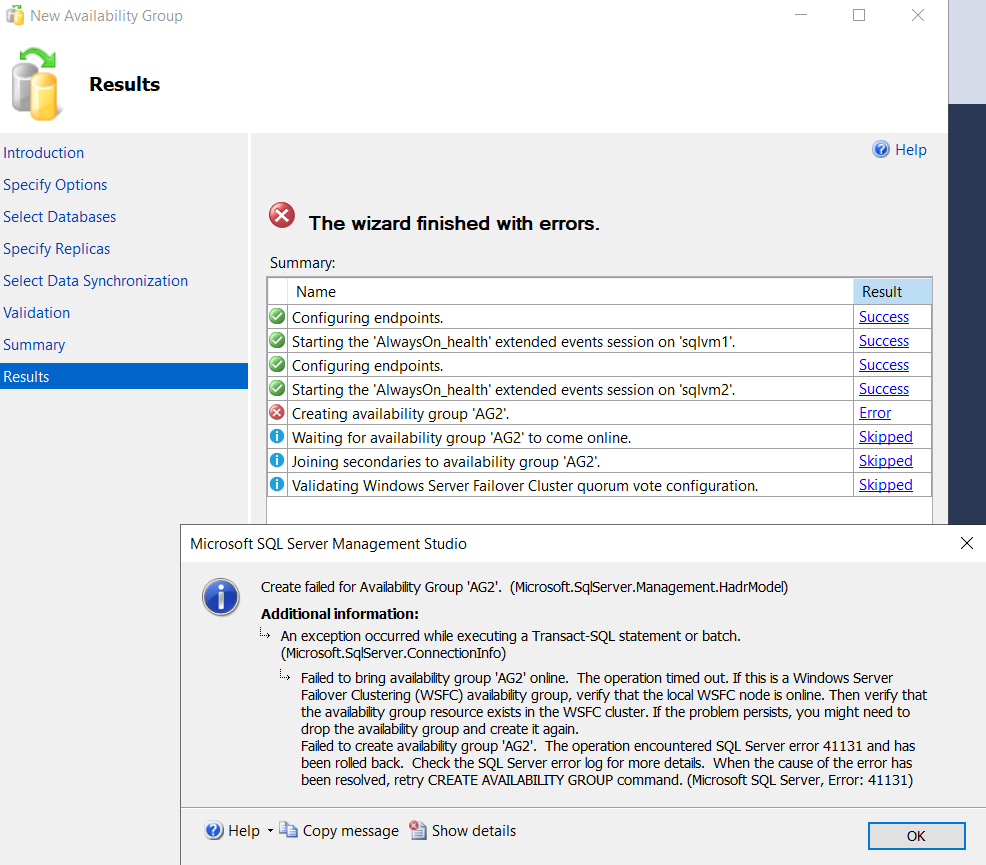
Failed to bring availability group 'AG3' online. The operation timed out. If this is a Windows Server Failover Clustering (WSFC),41131

Image
I got this error when I am trying to configure in "SQL Server Azure Virtual Machines" . Got the error when trying to create a Availability Group. TITLE: Microsoft SQL Server Management Studio ------------------------------ Create failed for Availability Group 'AG3'.  (Microsoft.SqlServer.Management.HadrModel) For help, click: https://go.microsoft.com/fwlink?ProdName=Microsoft+SQL+Server&ProdVer=16.100.47021.0&EvtSrc=Microsoft.SqlServer.Management.Smo.ExceptionTemplates.FailedOperationExceptionText&EvtID=Create+AvailabilityGroup&LinkId=20476 ------------------------------ ADDITIONAL INFORMATION: An exception occurred while executing a Transact-SQL statement or batch. (Microsoft.SqlServer.ConnectionInfo) ------------------------------ Failed to bring availability group 'AG3' online.  The operation timed out. If this is a Windows Server Failover Clustering (WSFC)  availability group, verify that the local WSFC node is online. Then verify that the ...

Configure VPN gateway transit for Virtual network peering

Image
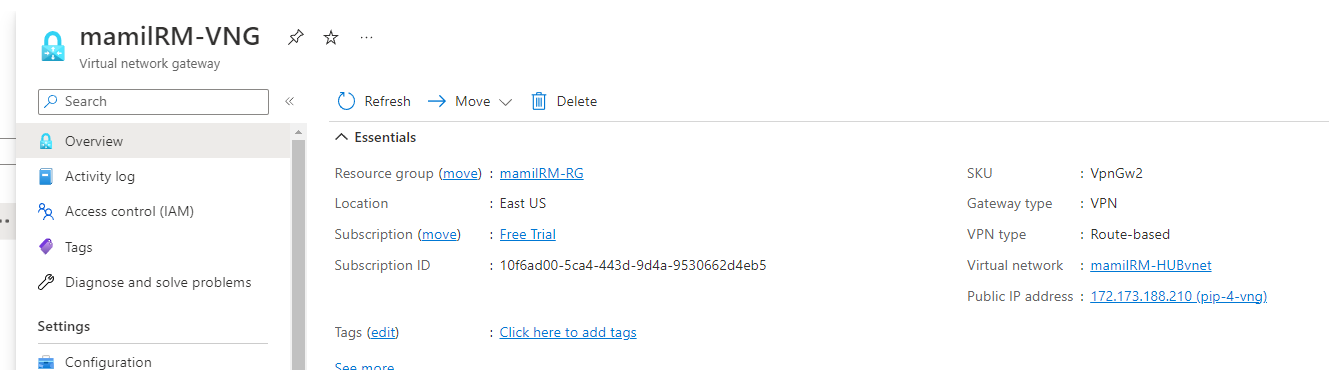
 Configure VPN gateway transit for Virtual network peering: Please go through the below links  https://learn.microsoft.com/en-us/azure/vpn-gateway/vpn-gateway-peering-gateway-transit Screenshots have been provided for a couple of configuration options The below VNET configuration descries about peering between A to C and B to C and C will act as HUB net. https://learn.microsoft.com/en-us/azure/virtual-network/virtual-network-peering-overview

CPU_MEMORY_CORE

Image
 This is how cpu, core , memory dependent on each other Each node has CPU, cpu internally split as CORES and memory will be allocated to each core.

Adding database to Always On Availability Groups(AOAG) with Powershell, Add-SQLAvailabilityDatabase

Image
By using the below Powershell Command we can add database to AOAG instantly. But ensure that the path we have given for data and log files should be similar(same drive and folder strucute) in both the replicas. CLS #Change the dircectory CD to primary replica node SQL Server CD SQLSERVER : \SQL\NODE1 #Please provide shared path info dont give individual acccount $DatabaseBackupFile = "\\node1\aoag_backup\C\C_FULL_09172022.BAK" $LogBackupFile = "\\node1\aoag_backup\C\C_log_09172022.trn" #If your sql server instance is DEFULT instance please provide DEFAULT below, if it is named instance servername\instancename $MyAgPrimaryPath = "SQLSERVER:\SQL\NODE1\DEFAULT\AvailabilityGroups\AG1" $MyAgSecondaryPath = "SQLSERVER:\SQL\NODE2\DEFAULT\AvailabilityGroups\AG1" #Take the FULL and transaction log backup in from the primary replica Backup-SqlDatabase -Database "C" -BackupFile $DatabaseBackupFile -ServerInstance "N...

Database stuck in Synchronized\Recovery Pending state.

I faced this issue in one of my client production environments . Databases are configured on AOAG. But one day one of the databases have gone into SYNCHRONIZED /RECOVERY PENDING state   We tried to check the progress of this database in READERROR log of  that particular database, in the error log it says 99% completed , after that there is no progress. At the same time we don't see any REDO Log Commit LSN or SEND LSN values under AOAG dash board.  Dont remove the database from AOAG and re added AOAG again. Simply run the below command and it did the trick. USE master go ALTER DATABASE DatabseName SET ONLINE

GRANT VIEW or GRANT VIEW ANY PERMISSION

/* This permision(SP_HELPTXT) is only on those particular databases and those particular logins only */ USE Database1 GO GRANT VIEW DEFINITION TO [ Domain \ User1] GRANT VIEW DEFINITION TO [ Domain \ User2] go USE Database2 GO GRANT VIEW DEFINITION TO [ Domain \ User1] GRANT VIEW DEFINITION TO [ Domain \ User2] /* Granting VIEW(SP_HELPTEXT) permissions to on ALL databases in that server and to this account only */ USE master GO GRANT VIEW ANY DEFINITION TO USER1 The below command will give ALTER,CONTROL and VIEW DFFINITION permissions on a sepcific database. USE Test GO /* The below commands will give you Modify or ALTER Stored procedure and see the text of the logical objects which are created with dbo */ GRANT ALTER ON SCHEMA ::dbo TO LoginName GRANT CONTROL ON SCHEMA ::dbo TO LoginName GRANT VIEW DEFINITION ON SCHEMA ::dbo TO LoginName

EXEC sp_msforeachdb

 Below is the example. The below query will change the owner of all the databases to sa at a time sp_msforeachdb @ command1 = 'USE ?;IF DB_ID(''?'') > 4 begin EXEC sp_changedbowner ''sa'' end' Getting all the table information at time sp_msforeachdb @ command1 = 'USE ?;SELECT * FROM sys.Tables'

Export-DbaLogin, dbatools

Image
After running this script also check for Orphan users once. <# This will script out all the login(server principals and user permissions(database principals) to the below mentioned file in temp folder of C drive. After run this script in respective destination server also please check orphan users once. #> Export-DbaLogin ` -SQLInstance RAMESH\PROD ` -OutFile 'C:\temp\RAMESHPROD_LOGIN_USER_Permissions_08082022.txt' ` -Verbose The below piece of code will automatically generate the time stamp with server database details. $servername = "myServerNameHere" $dbName = "dbNameHere" $date = Get-Date Export-DbaLogin ` -SqlInstance $servername ` -Database $dbName ` -Verbose ` -FilePath "C:\AzureBackpack\ $( $ servername) _ $( $ dbName) _ $( $ date.ToString("yyyyMMdd_HHmmss") ).txt" The below command will script out individual login level permissions. $instance = "MAPS" $date = Get-Date -Format ...

Running queries with OSQL.EXE

Image
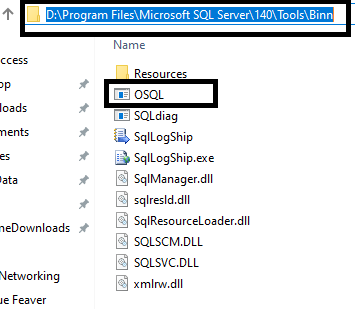
Sometimes we can run SQL queries with a tool called OSQL.EXE . This is available in the below path by default based on SQL Server version. D:\Program Files\Microsoft SQL Server\140\Tools\Binn\OSQL.exe.  See the below image. By using the OSQL tool I have a run a SELECT query.  -S ServerName or InstanceName -i   Path in which I saved the .SQL query which contains SELECT command. And I      saved it in a  folder of a drive. -E  Windows Authentication -U  SQL Authentication. -P Password need to be provided if you choose SQL Authentication(-U). Below case I have chosen Windows Authentication And my select query looks below. And I save this to AdventureWorks2012 folder of D drive.  USE AdventureWorks2012 GO SELECT top 10 * FROM [HumanResources].[Department] Go to Run-->Cmd--> and here is the query and double quotes("") are compulsory If you want to export above result set to text file pass a parameter called -o and prov...

How to move .txt files from one drive to another drive with powershell commands.

The below command will move the .txt files from one drive to another drive. If you want to move .BAK files( SQL Server database backup files) from one drive to another drive in the place of .txt file add .BAK extension. cls $Files = Get-ChildItem ` -Path "D:\Folder1\SubFolder1\Subfolder2" -Recurse -Verbose| Where-Object { $_ .Extension -like '.txt' } $Files | ForEach -Object{ $NewFiles = $_ Move-Item ` -Path "D:\Folder1\SubFolder1\Subfolder2\$NewFiles" ` -Destination "C:\data" ` -Verbose }

Microsoft Cluster Services(MSCS) Cluster Verification Errors.

Image
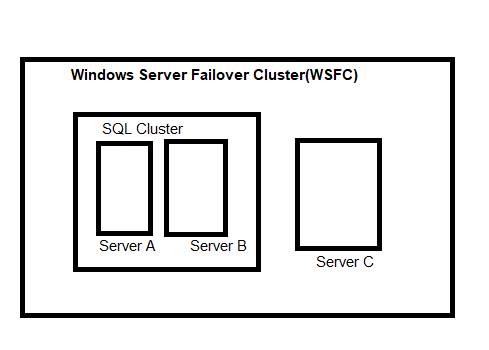
 I have configured Always On setup between SQL Cluster environment and an individual node which is a part of WSFC but not part of SQL Cluster. Here the SQL Cluster configured between A and B(internally these two also part of WSFC. Because Windows cluster is prerequisite to configure SQL Cluster), and the C is part of WSFC.  I got the below error(second image) when I am trying to install SQL Server instance on one of the windows servers. Work around: We need to Verify the windows cluster setup before we install SQL Server. So once the cluster configuration results pass then we will not see the below error. So validate cluster configuration before you install SQL Server 

Exporting data into a text or csv file and Importing the same data into another table from text file with Bulk Copy Processing(BCP)

Image
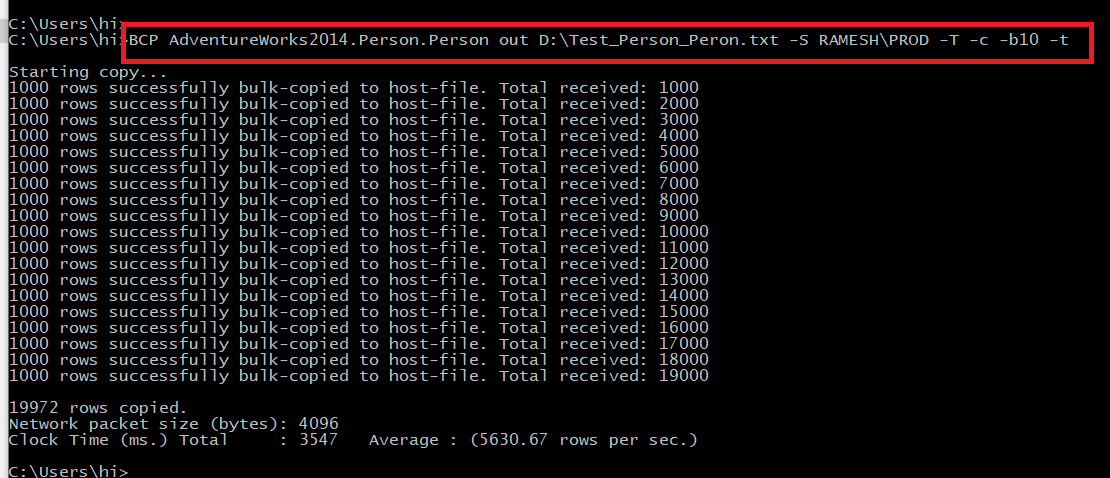
The below BCP command will export the data(OUT) from table to a text file(.txt) and from the .txt file it will import(IN) the data to another table. Commands are give below. BCP AdventureWorks2014.Person.Person out D:\Test_Person_Peron.txt -S RAMESH\PROD -T -c -b10 -t -S  --> ServerName -T  --> Windows Authentication -b10 --> The amount of batches -t    --> Delimiter values(Eg:',', SPACE, TAB) -c    --> If you pass this this will not ask for " Enter the file storage type of field <field_name> [<default>]:" Running BCP command with SQL Query here is the command The below command will BCP out to a CSV(excel file). If you see excel it will capture all column information in single column. However it will appropriately insert the data into destination table. The below BCP command will push the data into required table from .CSV file . Here is the command .

How to capture sp_whoisactive result set into a table.

The below query will push the data into histroy for our future reference or analysis purpose, we can schedule this query or we can run wehenever we need it. /* 1) The beloq query will script out sp_whoisactive stored procedure table structure in a print format. I have create table in master database, but we can create it on other database aswell. */ DECLARE @CaptureSchema VARCHAR ( MAX ) EXEC sp_WhoIsActive @output_column_list = '[dd%][session_id][sql_text][sql_command][login_name][wait_info][tasks][tran_log%] [cpu%][temp%][block%][reads%][writes%][context%][physical%][query_plan][locks][%]' , @return_schema = 1 , @get_plans = 1 , @ schema = @CaptureSchema OUTPUT PRINT @CaptureSchema /* The below query will push the data into a table(creating table with the script that the above resultset) please notice @destination_table parameter below. */ EXEC sp_whoisactive @output_column_list = '[dd%][session_id][sql_text][sql_command][login_name][wait_info][tasks][tr...

LAG function in SQL Server( Getting difference between values from the same column)

Image
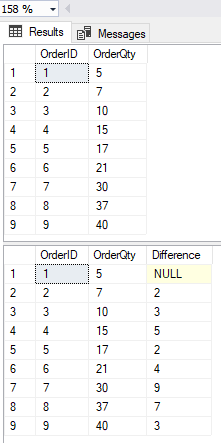
The below query will get the difference between the values of the same column not difference between two different columns. Here is the query, the query will showing the difference between OrderQty. USE DatabaseNameHere GO DECLARE @TEST TABLE (OrderID INT , OrderQty INT ) INSERT INTO @TEST VALUES ( 1 , 5 ),( 2 , 7 ),( 3 , 10 ),( 4 , 15 ),( 5 , 17 ),( 6 , 21 ),( 7 , 30 ),( 8 , 37 ), ( 9 , 40 ) SELECT * FROM @TEST SELECT OrderID,OrderQty,[Difference]=OrderQty-LAG(OrderQty)OVER( ORDER BY (OrderQty)) FROM @TEST

Handling split backups with Ola Hallengren script

The below mentioned query will used for split backups which is extracted from  Ola Hallengren  scripts. @NumberOfFiles parameter will create mentioned files. EXECUTE [dbo].[DatabaseBackup] @ Databases = 'ALL_DATABASES' , @ Directory = 'N:\SQLBackups\' , @ BackupType = 'FULL' , @ Verify = 'Y' , @ CleanupTime = 168 , @ CheckSum = 'Y' , @ LogToTable = 'Y' , @ compress = 'Y' , @ NumberOfFiles = 3

Property ErrorLogFile is not available for JobServer 'ServerNameHere'. This property may not exist for this object, or may not be retrievable due to insufficient access rights. (Microsoft.SqlServer.Smo)

I got the below error in SQL Server 2008 R2. When we try to see the properties of SQL Server agent(right click on the SQL Server Agent and click properties). I could see the below error message. Property Error Log File is not available for JobServer 'ServerNameHere'. This property may not exist for this object, or may not be retrievable due to insufficient access rights.  (Microsoft.SqlServer.Smo) Cause: SQL Server unable to find or deleted the Errorlog of SQL Server Agent. So we need manually set this up to rectify this error. If you run the below procedure first(sp_get_sqlagent_properties) it will show as NULL. Because that path has not been defined yet. So we need to set it up with the second stored procedure below as (sp_set_sqlagent_properties) USE MASTER GO EXEC msdb .. sp_get_sqlagent_properties GO USE MASTER GO EXEC msdb . dbo . sp_set_sqlagent_properties @errorlog_file = N 'C:\Program Files\Microsoft SQL Server\MSSQL10_50.MSSQLSERVER\MSSQL\LOG\SQLAGENT.OUT' ...

How to read audit file from drive,CREATE SERVER level AUDIT

Image
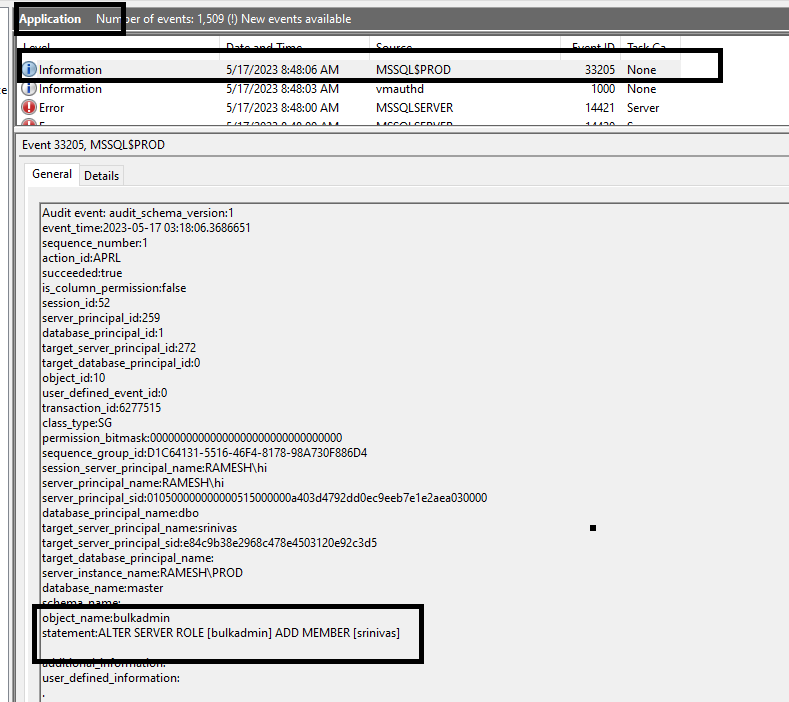
The below query will tell us about how to import data from SQLAUDIT file to table in a database. We are creating a table here and importing data from file SELECT * INTO Audit_HumanResources_Department FROM ( SELECT event_time ,action_id ,session_server_principal_name AS UserName ,server_instance_name ,database_name , schema_name ,object_name , statement FROM sys.fn_get_audit_file( 'G:\Audit\HumanResource_Department\*.sqlaudit' , DEFAULT , DEFAULT ) --WHERE YEAR(event_time)=YEAR(GETDATE()) --AND month(event_time)=month(getdate()) --and day(event_time)=day(getdate()) )T The below piece of code will explain about create server level audit with Windows Application Event logs and its specifiactions and how the logs information will be route to eventlogs(eventvwr) applicatin logs. Before that we need to provide permissons at SECPOL.MSC(Local Security Policy). Below link will be explained about how give permissions that particular SQL Server serice account. https:...

Database Size Calculation in SQL Server

This is a sample calculation and dont provide the proof log file size calculation use DatabaseName GO EXEC sp_spaceused Reserved = Data + Index + Unused( All values in KB) 230540328 = 64265016 + 164723400 + 1551912 Reserved = 230 GB DatabaseSize = Reserverd + LogFileSize( Values in GB) 280 = 230 + 50 ----Free space calculation 1 ’ 551 , 912 / 64 , 265 , 016 = 2 %

Which query is causing to the log file growth.

 Sometimes when we are online, we could see that log file grow continuously. The below query will tell us which query is causing to that logfile growth of that particular database. SELECT session_id, dt.transaction_id, DB_NAME(database_id) as DB, sum (database_transaction_log_bytes_used) TotalLogBytesUsed FROM sys.dm_tran_database_transactions dt LEFT JOIN sys.dm_tran_session_transactions st on (dt.transaction_id = st.transaction_id) GROUP BY session_id, dt.transaction_id, database_id ORDER BY 4 DESC

How much portion or percentage BACKUP or RESTORE command is completed.

 The below query will tell us how much portion of BACKUP or RESTORE is completed. ---How much portion of BACKUP OR RESTORE is completed. SELECT session_id as SPID, command, a. text AS Query, start_time, percent_complete, dateadd( second ,estimated_completion_time / 1000 , getdate()) as estimated_completion_time FROM sys.dm_exec_requests r CROSS APPLY sys.dm_exec_sql_text(r.sql_handle) a WHERE r.command in ( 'BACKUP DATABASE' , 'RESTORE DATABASE' )

dbatools download and installation

Image
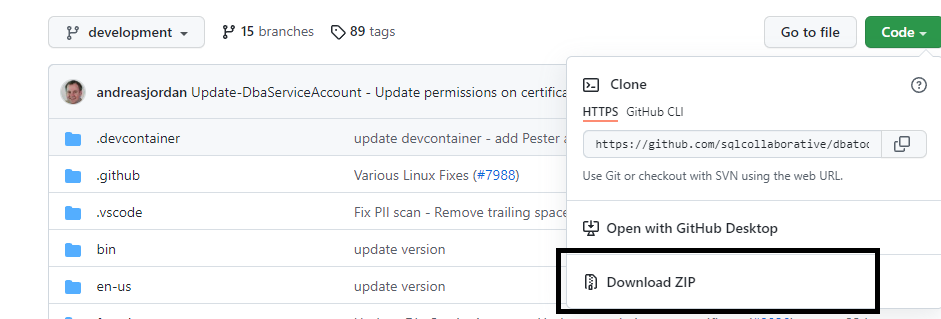
Click on the below link( dbatools ) and found "DownloadZip" under CODE. Once the zip folder is downloaded it will download as  "dbatools-development". and extract it. After that change the folder name from "dbatools-development" to "dbatools". And sometimes there is a possibility that dbatools folder contains another dbatools-development folder with in the folder,if that is the case please make there is only one "dbatools" folder not any duplicate folders with in it. dbatools In the search space search with "ISE" and choose PowerShell and run as administrator and run the below command. And it will give the paths of modules like below. You can find these many paths for modules and copy the dbatools folder from source to " C:\Program Files\WindowsPowerShell\Modules " folder  and run the below command in PowerShell and you can see the progress of installation and will successfully install it.

New-NetFirewallRule

Image
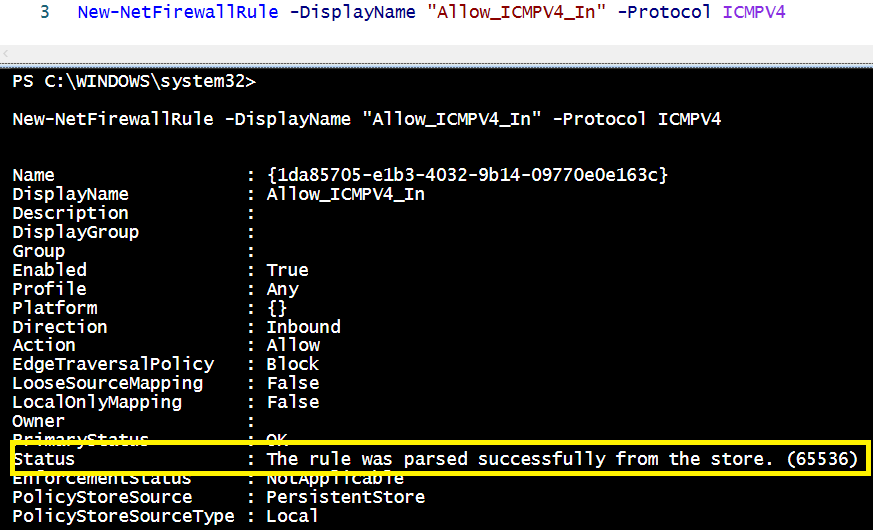
 The below command will allow fire wall rule to get results through ping command and to access the server remotely.

Could not drop login 'loginname' as the user is currently logged in.

Image
 I  go the below error in one our environments. Below are the troubleshooting steps. Run the below command find the session id that are using by that particular session KILL all the session KILL SELECT session_id FROM sys.dm_exec_sessions WHERE login_name = 'LoginName' And then run the below command USE [master] GO DROP LOGIN [LoginName]

Finding the free space in the data file of database in SQL Server.

The below query will provide us the amount of free space that exist at database data file level. CREATE TABLE # FileSize (dbName NVARCHAR( 128 ), [FileName] NVARCHAR( 128 ), physical_name varchar ( 150 ), type_desc NVARCHAR( 128 ), CurrentSizeMB DECIMAL ( 10 , 2 ), FreeSpaceMB DECIMAL ( 10 , 2 ) ); INSERT INTO # FileSize (dbName,[FileName],physical_name,type_desc, CurrentSizeMB, FreeSpaceMB) exec sp_msforeachdb 'use [?]; SELECT DB_NAME() AS DbName, name AS FileName, physical_name, type_desc, size/128.0 AS CurrentSizeMB, size/128.0 - CAST(FILEPROPERTY(name, ''SpaceUsed'') AS INT)/128.0 AS FreeSpaceMB FROM sys.database_files WHERE type IN (0,1) and type_desc=''ROWS'';' ; SELECT * FROM # FileSize WHERE dbName NOT IN ( 'distribution' , 'master' , 'model' , 'msdb' ) and type_desc = 'ROWS' and physical_name LIKE 'E:\%' --A...
The subscription(s) have been marked inactive and must be reinitialized. NoSync subscriptions will need to be dropped and recreated. (Source: MSSQLServer, Error number: 21074),REPLICATION

Distribution Agent job failed with below erro message and the below workaround fixed the issue in my environment Error messages: The subscription(s) have been marked inactive and must be reinitialized. NoSync subscriptions will need to be dropped and recreated. (Source: MSSQLServer, Error number: 21074) USE Distribution GO SELECT STATUS,* FROM [dbo].[MSsubscriptions] WHERE PUBLISHER_DB= 'PublisherDBNameHere' use distribution go update MSSubscriptions set [status] = 2 WHERE PUBLISHER_DB= 'PublisherDBNameHere' And to check thestatus after above command use distribution go exec sp_browsereplcmds

Login Creation, Adding Login to Server Role and extracting info, dbatools

The below powershell query will create a login it could be a windows login or SQL Server Authentication login we can create those login by using below query and add that particular login to particular role and can extract the info. If that particular login alredy exists in the environment the query will ignore or if you mention -FORCE parameter it will overwrite. cls $ServerList = @ ( "Instance1" , "Instance2" , "Instance3" ) $ServerList | ForEach -Object{ $indserver = $_ New-DbaLogin -SqlInstance $indserver -Login "DomainName\WindowsLoginGroup" | Select-Object ComputerName,InstanceName,SqlInstance,Name,LoginType,CreateDate,LastLogin,HasAccess,IsLocked,IsDisabled Set-DbaLogin -SqlInstance $indserver -Login "DomainName\WindowsLoginGroup" -AddRole sysadmin| Select-Object ComputerName,InstanceName,SqlInstance,LoginName,ServerRole Get-DbaLogin -SqlInstance $indserver -Login "DomainName\WindowsLoginGroup" | Select-Objec...

db_executor role.

 The below database role will create a new role called db_executor, a role which gives permissions to all users to execute all the stored procedures of that particular database. Whoever associated to this role. -- Create a db_executor role CREATE ROLE db_executor -- Grant execute rights to the new role GRANT EXECUTE TO db_executor

Differences between Azure SQL Managed Instance and Azure SQL Database.

Image
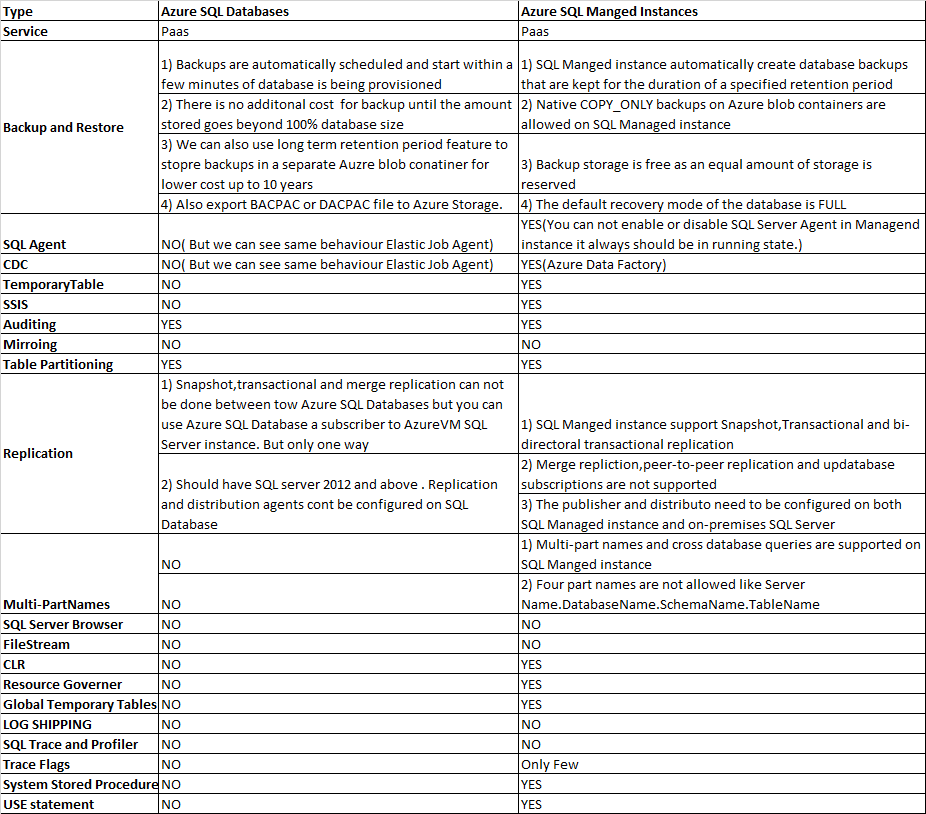
Feature differences between Azure SQL databases and Azure SQL Managed instance . I have not mentioned here about the SQL Server in Azure Virtual machine as it is equal to on premises SQL Server and there would not be any much differences in the environment.

Restore-DbaDatabase,dbatools

Image
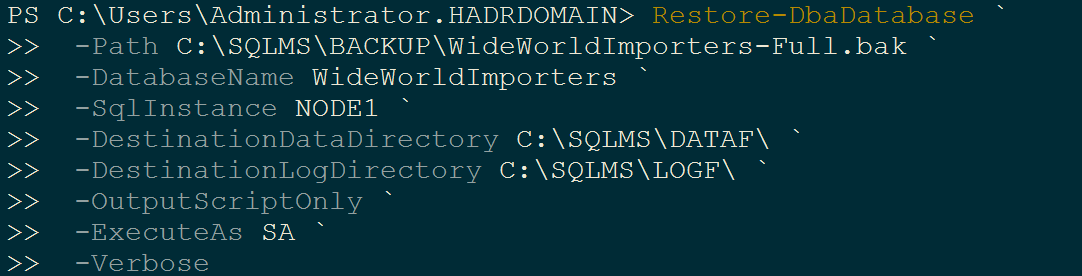
We can use below dbatools to restore database. Export-DbaUser will export all the respective database users to a spcific file. If you want all the user script need to add single file then user -FilePath parameter.If you want indivual files need to created user -Path parameter. cls Export - DbaUser ` - SqlInstance InstanceNameHere ` - Database DatabaseNameHere ` - FilePath C : \ Temp \ Users_DatbaseNameHere_InstanceNameHere. sql ` - Verbose In the below command -Path parameter you no need pass .BAK file it will automatically read file. -WithReplace option will overwrite the existing database. Restore - DbaDatabase ` - SqlInstance InstanceNameHere ` - DatabaseName DatabaseNameHere ` - Path H: \ TodayRestore ` - DestinationDataDirectory "F:\Program Files\Microsoft SQL Server\MSSQL12.MSSQLSERVER\MSSQL\Data\DatabaseName_Data.mdf" ` - DestinationLogDirectory "G:\Program Files\Microsoft SQL Server\MSSQL12.MSSQLSERVER\MSSQL\Data\DatbaseName_Log.ldf" ` - Wit...